

Only guests see ads. Create a free account and/or log in for a complete ad-free experience.


SirMadsen
Administrators
-
Joined
-
Last visited
Files posted by SirMadsen
-
Windows 11 Debloater is another customization option that allows advanced users to disable/enable various Windows 11 features by generating and running a PowerShell script.
Windows 11 Debloater is portable, making it an excellent asset for those that work on multiple machines. The UI is tab-based and groups points of interest for quick access.
You can use EZ Debloater (first tab on UI) to easily debloat, select what you want from the many options, or choose a preset first from ‘Debloat Preset’ to create the ultimate PowerShell script to debloat Microsoft Windows 11. Create your radio buttons preset. You can run the script directly from the program. This option also includes disabling Cortana background apps and disabling Microsoft Edge as the default PDF app.
For those using Windows 10, Windows 10 Debloater from the same author is also available.
It is always advised when performing actions like those included in Windows 11 Debloater; you should create a restore point and backup your data just in case you run into an issue.
- Free
- 9 Downloads
-
Windows 10 Debloater is a portable customization utility that allows advanced users to disable/enable many Windows 10 features via PowerShell scripts.
Windows 10 Debloater is the perfect app for those who need to work on multiple Windows 10 machines. For those using Windows 11, Windows 11 Debloater from the same author is also available.
Windows 10 Debloater uses a tab-based UI grouping specific areas of interest for quick access.
You can use EZ Debloater (first tab on UI) to easily debloat, select what you want from the many options, or choose a preset first from ‘Debloat Preset’ to create the ultimate PowerShell script to debloat Microsoft Windows 11. Create your radio buttons preset. You can run the script directly from the program. This option also includes disabling Cortana background apps and disabling Microsoft Edge as the default PDF app.
It is always advised when performing actions like those included in Windows 10 Debloater; you should create a restore point and backup your data just in case you run into an issue.
- Free
- 34 Downloads
-
Gaming Debloater will feel familiar to those acquainted with Windows 11 Debloater as it is a customized version. Gaming Debloater maintains most of the features and categories found in the original program but includes several adjustments intended to enhance your machine's gaming performance. Even though some of the settings offered in Gaming Debloater are similar to those found in Windows 11 Debloater, rest assured, they are all specifically aimed at optimizing your gaming experience.
With Gaming Debloater, you have the ability to install or uninstall various third-party tools. It's important to note that the tools listed on Gaming Debloater are specifically tailored to enhance your gaming experience. This includes but is not limited to, tools such as Adobe, Java, and photo/video players. In addition, you also have the option to install or remove Windows apps.
Gaming Debloater allows for the disabling of several Windows services intended to enhance startup speed and prevent sleep. Additionally, the software provides a range of Windows tweaks, UI customization options, and tools for personalizing Windows Explorer.
Gaming Debloater lets you remove unnecessary features, functions, and options that might slow down your computer and cause lagging issues, making it an excellent tool that can help enhance your system's performance during gaming sessions.
It is always advised when performing actions like those included in Gaming Debloater; you should create a restore point and backup your data just in case you run into an issue.
- Free
- 13 Downloads
-
OpenLoco is an Open Source re-implementation of Chris Sawyer's Locomotion, a construction and management simulation video game that simulates running a transport company.
OpenLoco is an open-source re-implementation of Chris Sawyer's Locomotion (CSL). CSL is the spiritual successor to Transport Tycoon, and OpenLoco aims to improve the game, similar to how OpenTTD enhanced Transport Tycoon and OpenRCT2 improved RollerCoaster Tycoon.
Chris Sawyer's Locomotion was initially written by Chris Sawyer in x86 assembly, building on top of his RollerCoaster Tycoon 2 engine. Much of the code is 1:1 with RollerCoaster Tycoon 2. However, the engine has changed substantially enough that OpenLoco currently does not share its codebase with OpenRCT2.
Recent implementation efforts have focussed on re-implementing the UI so that the data structures involved may be better understood. Once this is done, we hope the game logic will be easier to understand and implement.
- Free
- 7 Downloads
-
With this very small program you can pin any other program to always stay on top. It is portable and can be run on new as well as older Windows versions. When run it sits in the system tray, click the icon and then click on the window you want to have always on top, or open up the program and do it from there.
There are many advanced software to achieve the same but this have one feature and one feature alone, and it does it very well and requires no installation.
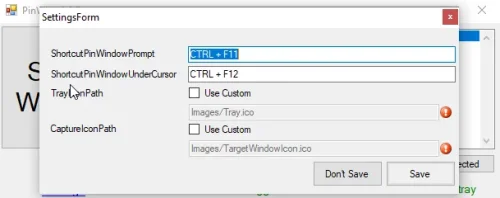
Basic functionality is there, tested on Windows XP, 7, 8.1 and 10. Multi-monitor supported (verified dual extend configuration). High DPI supported (verified 100-200%). Select another window to be top most via CTRL+F11 (same as DeskPins). Make window under cursor top most via CTRL+F12 (save a drag-and-click). User friendly installer with upgrade support. Configurable keyboard shortcuts (select and pin window, pin under cursor).- Free
- 11 Downloads
-
The base game of Aliens Versus Predator 2 is notable for its unique gameplay, allowing players to experience the story from three distinct perspectives: a Colonial Marine, a Predator, and an Alien. Each character type offers a vastly different play style and abilities, providing varied and immersive gameplay experiences. The Marine campaign focuses on survival horror, with tense and atmospheric gunplay. The Predator campaign offers a more strategic approach, utilizing advanced technology and stealth. The Alien campaign provides a visceral melee experience, emphasizing agility and close-quarters combat.
"Primal Hunt," the expansion included in the Gold Edition, adds new storylines and missions that precede the events of the main game. It introduces additional elements and weapons to the three factions, further diversifying the gameplay. The expansion also features new environments and challenges, enriching the narrative and lore of the Alien and Predator universe.
Graphically, Aliens Versus Predator 2: Gold Edition was praised for its detailed and atmospheric environments, which effectively captured the dark and foreboding essence of the film series. The game’s use of lighting and shadows added to the suspense, especially in the Marine campaign, where players must navigate through dimly lit corridors teeming with alien threats.
Aliens Versus Predator 2: Gold Edition is a definitive collection that combines thrilling first-person shooter gameplay with the rich lore of two iconic sci-fi franchises. Its diverse campaigns, immersive environments, and engaging multiplayer mode make it a standout title, offering a comprehensive and thrilling experience for fans of the series and the first-person shooter genre.
- Free
- 2 Downloads
-
Who wouldn't like post-apocalyptic games that present us with their version of the dark future and force us to think about the fates of humanity. Twilight: 2000 is exactly the kind of game that created its own version of the event and indicates how fast the world can go to war. The game takes place in the 1990s, when NATO and Warsaw Pact troops faced a brutal, devastating war that turned Poland into a devastated and infested country. There is really very little left of the country, and even that little wants to be controlled by the ruthless Baron Czarny. Of course, your goal is to do everything possible to stop him and prevent him from doing even more damage in such a hard-hit country. This is a very well thought out RPG game, where you have to organize a total of 20 soldiers who will obey your orders. Each soldier has his own nature, so each individual responds differently to orders. You have to pay attention to all the characteristics of the soldier - personality, abilities, languages he speaks, etc. The game requires quite a bit of planning to make your missions successful and to minimize losses on your loss.
- Free
- 1 Downloads
-
SkyNET was Bethesdy's final game based on a Terminator license. It was originally developed as a data drive for its predecessor Terminator: Future Shock, but during development it decided to become a standalone game. One of the noticeable improvements, this time was the ability of Xngine to display the game in a higher resolution of 640x480 (the previous game ran only in the classic 320x200). If you had Future Shock installed with SkyNET, you could also play the game in this new resolution. In addition to the new single-player campaign, new multiplayer options have been added.
Like any sequel, SkyNET had to show that it knew more. The player's task is to prevent the machine from launching the recovered nuclear weapon. More variable environments, day and night missions, as well as driving and flying machines. All this is offered by SkyNET, wrapped in feature briefings and usual acting performances, as was the case at the time.
- Free
- 2 Downloads
-
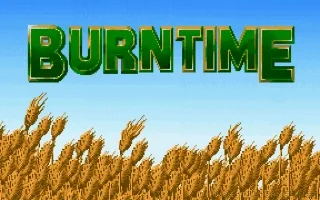
People have always loved catastrophic scenarios where they imagine how bad humanity can end. These scenarios are the subject of many books, movies, but also computer games. One of those games is Burntime. The game itself draws you straight into the action. It is not explained what is the cause, but suddenly you find yourself on an Earth whose entire surface is covered by a desert. Cities have been destroyed, lakes and rivers have dried up, almost all of humanity has become extinct. Only a few strong individuals have survived, struggling for their bare lives and trying to find a source of drinking water. The game is a combination of RPG and strategy. At the beginning, you choose the character you will play for. The goal is quite clear: to find a source of drinking water, search for a need, fight monsters and defend the conquered territories. Gradually, you can expand your group, invite more people, and at the same time you can hire mercenaries to guard your territories. At the time of the release, it was a relatively innovative game with a new concept of gaming, and I believe that even today, many hours will pass before the game starts to bore you.
- Free
- 2 Downloads
-
In Transport Tycoon, you are in charge of a transport company starting in 1930 in the midst of The Great Depression, and your aim is to build up an empire of trains, ships, lorries, planes and helicopters, with technological evolution to be taken into account. You can play alone, or with a number of computer-controlled rivals.
At the beginning of the game, you (and your rivals) have a large terrain at your disposal. The terrain is shown in isometric projection and includes hills, rivers, lakes, bridges, industrial facilities and a lot of small towns. It is up to you to decide how to start building your empire.
Maybe you can begin by connecting two towns with a road, building a vehicle depot somewhere next to the road, and setting up bus stops in both towns. Now just buy a bus (initially, there are just a few models available, but more buses appear with time), set its schedule, and watch as it goes between both bus stops, taking passengers and unloading them, earning you money. You can also transport passengers by building train tracks, sea ports, or airports and then buying appropriate vehicles - trains, ferries, planes.
If you set up a station next to an industrial facility (such as a factory, a power plant or a farm), you can also transport various cargo, such as coal, livestock or wood, which allows you to earn much more money than transporting passengers. Of course, you'll have to buy special lorries and train cars if you'll want to deal with these. Most businesses offer certain types of cargo and are ready to pay for transporting other cargo to them; for example, a steel mill has a lot of steel to fill your cars, and will gladly accept iron ore if you have any.
Clicking on any of your vehicles brings up a small window where you can observe a live feed of what the vehicle is doing and look up its status. If anything important happens during the game (such as a particular station accepting its first vehicle), it is shown as a newspaper headline at the bottom of the screen.
Various versions exist building upon the DOS original, with the most notably different being the PlayStation port, which in addition to the isometric graphics includes a 3D view of the world map taking advantage of the PlayStation’s graphics hardware. The game was followed up with the release of the World Editor and later re-released in enhanced form as Transport Tycoon Deluxe.
- Free
- 2 Downloads
-
Bubble Hero 2 builds on the first game while keeping its basic formula intact. It's still a Bubble Bobble clone at heart. This time, two players can play together, choosing from a set of four characters; the first game's protagonists Abi and Ni Ni are joined by pint-size dragon boxer Beibei and the shy, studious Xiaozhen. The game has received an overall facelift, and is now depicted in high-res 640x480 hand-drawn spritework; an animated introduction and short cutscenes between levels also give the game a simple story.
- Free
- 83 Downloads
-
Tough Guy is a fighting game similar to Street Fighter. Choose one fighter and travel all over the world to choose and challenge a wide variety of fighters.
A unique feature of Tough Guy is that fighters have the ability to refill their health if they are injured. They also have super moves which can inflict a lot of damage on their opponent.
Although not as well-known as Sango Fighter games, Tough Guy has the same charm and excellent gameplay that makes Panda one of the most underrated fighting game companies of all time, let alone in Taiwan.
Crisp animation and graphics, many special moves, and diverse locales make this a fun game to play. The only downside is that the characters are too similar to each other. Still, it's a good fighting game no one should pass up.
- Free
- 4 Downloads
-
Opera GX is a special version of the Opera browser built specifically for gamers. The browser includes unique features like CPU, RAM and Network limiters to help you get the most out of both gaming and browsing.
Bring your gaming style to mobile. Connect mobile and desktop browsers with the file-sharing Flow feature, smoothly browse on the go with the one-handed Fast Action Button, and protect your privacy with the built-in ad blocker in the mobile browser for gamers.
Completely customize your color scheme with Opera GX to match your gaming setup. Choose from specially designed themes, and easily select GX desktop wallpapers as a gaming background. GX Mods completely changes the look, feel and sounds of the browser. Never miss a live stream. With Twitch right in your sidebar, you can easily see the channels you follow, who's online, and choose to receive notifications whenever someone you follow goes live. Talk with your teams, friends and communities with Discord in your sidebar. Join us on Discord to talk about gaming, give feedback on GX, and have fun with the Opera GX community. A world of music and podcasts at your fingertips. Connect to all your music services in one place, and switch between them easily. Chat and browse at the same time with Discord, Facebook Messenger, Telegram, Vkontakte, and WhatsApp integrated right into the sidebar. Save and collect web content easily, share it visually. Collect pictures, links, music, files and notes to create builds, compare hardware deals, or plan the ultimate gaming den - in easily shareable, eye-pleasing boards. Detach online videos to watch on top of other windows while you continue browsing. Control your privacy and security with the free integrated browser VPN. Browse with less headaches and load websites faster with the built-in ad blocker.- Free
- 194 Downloads
-
Repack by MagiPack (includes Jason's Freelancer Patch v1.25)
Freelancer is a direct sequel to Microsoft’s mission-based space combat simulator Starlancer. However, unlike its predecessor Freelancer combines combat and trading within an open world environment. Due to the involvement of Wing Commander's creator Chris Roberts it is largely considered to be the spiritual successor to Origin Systems’ Wing Commander: Privateer.
Set 800 years after the events of Starlancer, the game revolves around the adventures of freelance pilot Edison Trent, survivor of an attack on the space station Freeport 7. Having lost the deal of a lifetime (worth a million credits) in the attack, Trent teams up with Jun'ko ‘Juni’ Zane, of the Liberty Security Force, and together they begin to investigate events connected to the attack.
While the story progresses through the completion of specific storyline missions, Trent is free to spend time exploring, trading, or even smuggling. He also has the option of taking freelance combat missions offered by the many factions that inhabit the 48 star systems within the game.
The star systems themselves are beautifully detailed. A vast range of planets await exploration, along with brightly burning stars, nebulas, treacherous asteroid fields and vast expanses of space junk (often home to hostile outcasts).
One striking feature of Freelancer is the way it is controlled. A joystick is not required as the game is keyboard and mouse driven. Keys control the forward movement of the ship while moving the mouse with the left button held down allows the ship to change direction. At the same time the targeting crosshair is dragged across the screen by the movement of the mouse and the right mouse button is then used to fire the ship’s guns. This works surprisingly well making it an instantly accessible game.
- Free
- 28 Downloads
-
This is the standard version of the StarfieldCustom.ini that is required for most addons to work properly. Nothing added, nothing changed. It's the raw file without any added modifications.
- Free
- 7 Downloads
-
Num 1 – God Mode Num 2 – Infinite Health Num 3 – Infinite Stamina Num 4 – Max Strength Num 5 – Max Hydration Num 6 – Max Fullness Num 7 – Max Rest Num 8 – Infinite Ammo/No Reload Num 9 – Set Game Speed Num 0 – Super Damage/One Hit Kills Num . – Damage Multiplier
Ctrl+Num 1 – Stealth Mode Ctrl+Num 2 – Obtain All Items Ctrl+Num 3 – Open Debug Console Ctrl+Num 4 – Freeze Daytime Ctrl+Num 5 – Set Time Lapse Speed Ctrl+Num 6 – Set Movement Speed Ctrl+Num 7 – Set Swim Speed Ctrl+Num 8 – Set Jump Height Ctrl+Num 9 – Infinite Jumps- Free
- 2 Downloads
-
PotPlayer provides the maximum performance with the minumum resource using DXVA, CUDA, QuickSync so you can get the best out of what you have. It supports various types of 3D glasses so you can get the 3D experience anytime you want using your 3DTV or PC with various output format (Side by Side, Top and Bottom, Page Flipping) supported. Text subtitles(SMI & SRT), DVD(Vobsub) and Blu-ray subtitles, ASS/SSA animation and SMI Ruby tags, etc. are supported. Supports OpenCodec (see plugin) so users can easily add whatever codecs they want. Smooth, seamless video play. Choose which one when you have 2 sound cards. Preview the scene with snapshots. You can bookmark your favorite scene or chapter. We support Direct3D9 Ex Flip Mode and Overlay. Supports various devices such as DVD,TV,HDTV.
I have included the Twitch extension in this so you can open Twitch channels directly in the player by adding a channel URL och simply copy-paste the URL.
- Free
- 4 Downloads
-
Audacious is an open source audio player. A descendant of XMMS, Audacious plays your music how you want it, without stealing away your computer’s resources from other tasks. Drag and drop folders and individual song files, search for artists and albums in your entire music library, or create and edit your own custom playlists. Listen to CD’s or stream music from the Internet. Tweak the sound with the graphical equalizer or change the dynamic range with audio effects. Enjoy the modern Qt-themed interface or change things up with Winamp Classic skins. Use the plugins included with Audacious to fetch lyrics for your music, display a VU meter, and more.
- Free
- 6 Downloads
-
ShareX is screen capture, image editor, upload, and productivity tool with a wide range of features. It can capture windows, areas of the screen, screen recording, etc. It has support for after capture automation tasks to save files and upload them. It has support for a variety of upload services and methods. ShareX also has basic editing and stamping features. In addition, it has tools like a color picker, screen ruler, hash check, and lots more.
- Free
- 2 Downloads
-
LibreWolf is a custom browser based on Firefox, focused on privacy, security and freedom. LibreWolf is designed to increase protection against tracking and fingerprinting techniques, while also including a few security improvements. This is achieved through our privacy and security oriented settings and patches. LibreWolf also aims to remove all the telemetry, data collection and annoyances, as well as disabling anti-freedom features like DRM.
- Free
- 12 Downloads
-
Windows File Manager (WinFile) is a modernized version of the file manager that was originally introduced in Windows 3.0. Microsoft has open sourced the original code and it is now being updated for modern versions of Windows by a team of developers.
- Free
- 4 Downloads
-
XnConvert is a fast, powerful and free cross-platform batch image converter. It allows to automate editing of your photo collections: you can rotate, convert and compress your images, photos and pictures easily, and apply over 80 actions (like resize, crop, color adjustments, filter, ...). All common picture and graphics formats are supported (JPEG, TIFF, PNG, GIF, WebP, PSD, JPEG2000, JPEG-XL, OpenEXR, camera RAW, HEIC, PDF, DNG, CR2). You can save and re-use your presets for another batch image conversion.
- Free
- 7 Downloads
-
TwitchDownloader is simple and very powerful program to download Twitch clips or entire Vod's and save them as a video file. You can even download chat to insert it in your video.
All you have to do is insert the url to the clip or Vod and the program will do the rest.
Don't forget to show the original author some love.
- Free
- 6 Downloads
-
This is just a small pack of sound effects that can be used in your streams or imported into your video editing software. Or pretty any other case use you can come up with.
- Free
- 2 Downloads
-
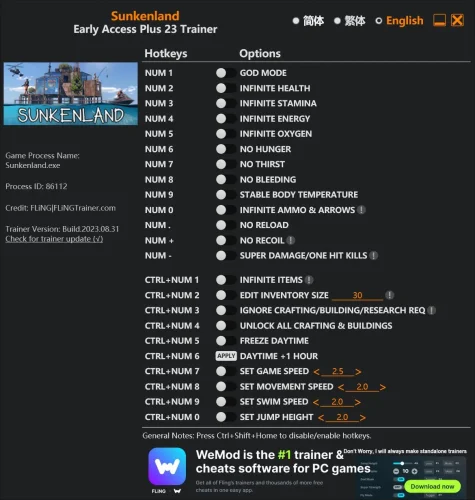
Num 1 – God Mode Num 2 – Infinite Health Num 3 – Infinite Stamina Num 4 – Infinite Energy Num 5 – Infinite Oxygen Num 6 – No Hunger Num 7 – No Thirst Num 8 – No Bleeding Num 9 – Stable Body Temperature Num 0 – Infinite Ammo & Arrows Num . – No Reload Num + – No Recoil Num – – Super Damage/One Hit Kills
Ctrl+Num 1 – Infinite Items Ctrl+Num 2 – Edit Inventory Size Ctrl+Num 3 – Ignore Crafting/Building/Research Requirements Ctrl+Num 4 – Unlock All Crafting & Buildings Ctrl+Num 5 – Freeze Daytime Ctrl+Num 6 – Daytime +1 Hour Ctrl+Num 7 – Set Game Speed Ctrl+Num 8 – Set Movement Speed Ctrl+Num 9 – Set Swim Speed Ctrl+Num 0 – Set Jump Height- Free
- 0 Downloads






Only guests see ads. Create a free account and/or log in for a complete ad-free experience.