

Only guests see ads. Create a free account and/or log in for a complete ad-free experience.
Utilities
26 files
-
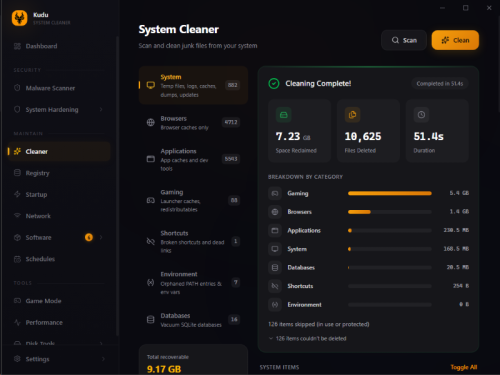
Kudu is a free system maintenance suite. It includes over 15 powerful tools to clean, optimize, and protect you. Open source, no ads, no bloatware.
- Free
- 0 Downloads
-
UniGetUI offers a graphical interface tailored for software management. It supports multiple package managers, including Winget, Scoop, Chocolatey, and others, allowing users to install, remove, or update software more conveniently.
What is UniGetUI?
UniGetUI is a user-friendly tool that allows users to manage software installations and updates without the need to interact with the Command Line. This simplifies the process and makes it accessible to a wider range of users.
UniGetUI's software catalog is extensive, featuring over 10,000 software packages across the three supported package managers. You are free to search for and explore the programs you need.
Real World Use Case
A friend of ours recommended this app after he tried to install Telegram from the Microsoft Store for a client, but it kept prompting him to log in with an MS Account. This utility can force-install it without an account. It even has a search feature on the top left; click on Discover to search for any app.
Sort Of Portable
The installer lets you install it or a portable version, but the portable version still requires Visual C++ dependencies, so it's not really portable. If you try to run it on a computer without them, you will get a myriad of missing Visual C++ libraries.
Using UniGetUI
Upon launching UniGetUI for the first time, users can select their preferred package managers. Winget and Chocolatey are enabled by default, but Scoop, a package manager geared towards more experienced users, can also be enabled.
Once you have selected a software package for installation, UniGetUI offers two options: the software can handle the installation automatically, or users can opt for the
Interactive Installation method for a more hands-on approach. Additionally, users may choose to skip the hash check, which can expedite the download process.
Can Scan Installed Programs for Updates
UniGetUI also includes a Software Updates utility that scans installed programs and alerts users to available updates, enabling efficient updates to multiple applications simultaneously.
Includes Uninstall Option As Well
To uninstall programs, users can navigate to the Installed Packages interface and select the applications they wish to remove. UniGetUI streamlines this process, making it quicker and easier for users to manage their installed software.
- Free
- 0 Downloads
-
Winaero Tweaker is a freeware app created by myself, Sergey Tkachenko. It is an all-in-one application that comes with dozens of options for fine-grained tuning of various Windows settings and features.
It also includes most options which were available in free standalone apps at Winaero.com and extends them as much as possible.
This web site is a new home for the app. It is ads-free, scripts-free, and web tracking-free.
Winaero Tweaker comes with plenty of features and tweaks. To name a few of them:
Shortcut tools that you can use
To launch an app as Administrator without a UAC confirmation.
To directly open any Control Panel applet or system folder.
To directly open any Settings page.
To create shortcuts to the classic Shut Down Windows dialog (Alt+F4), and Safe Mode.
To remove or customize the shortcut arrow overlay icon.
To remove the " - shortcut" suffix.
To remove blue arrows from compressed files.
Manage Windows apps and features.
Restore classic Windows Photos Viewer to use it instead of Photos.
Restore the classic sound volume pop-up slider.
Permanently disable Windows Telemetry and Data Collection.
Permanently disable Windows Defender.
Permanently disable Windows Update.
Disable ads and unwanted app installation (Candy Crush Soda Saga, etc).
Enable the built-in Administrator account.
Enable automatic Registry backup.
Change drag-n-drop sensitivity.
Disable Action Center and notifications.
Reset icon cache.
Reset all Group Policy options at once.
Networking options
Change the RDP port.
Make mapped drives accessible for elevated apps.
Tune up Windows appearance
Customize folders in This PC.
Customize entries in Navigation Pane in File Explorer (in the left pane).
Rename and change the icon for the Quick Access entry.
Increase the taskbar transparency level.
Show time seconds in the taskbar clock.
Disable blur for the sign-in screen.
Customize fonts, and the Alt+Tab dialog appearance.
Change the title bar color for inactive windows.
Context menus
Add handy context menus using a huge set of presets, e.g. to switch a Power Plan with one click, open a Command Prompt, add a Settings cascading menu - plenty of them.
Hide default entries from the context menu, e.g. Edit with Photos, Edit with Paint 3D, etc.
Add 'Run as Administrator' to VBS, MSI, CMD and BAT files.
Change the default app for the Edit context menu entry for images.
And MUCH more. Check out the official website for more information.
- Free
- 3 Downloads
-
Windows 10 Debloater is a portable customization utility that allows advanced users to disable/enable many Windows 10 features via PowerShell scripts.
Windows 10 Debloater is the perfect app for those who need to work on multiple Windows 10 machines. For those using Windows 11, Windows 11 Debloater from the same author is also available.
Windows 10 Debloater uses a tab-based UI grouping specific areas of interest for quick access.
You can use EZ Debloater (first tab on UI) to easily debloat, select what you want from the many options, or choose a preset first from ‘Debloat Preset’ to create the ultimate PowerShell script to debloat Microsoft Windows 11. Create your radio buttons preset. You can run the script directly from the program. This option also includes disabling Cortana background apps and disabling Microsoft Edge as the default PDF app.
It is always advised when performing actions like those included in Windows 10 Debloater; you should create a restore point and backup your data just in case you run into an issue.
- Free
- 34 Downloads
-
Windows 11 Debloater is another customization option that allows advanced users to disable/enable various Windows 11 features by generating and running a PowerShell script.
Windows 11 Debloater is portable, making it an excellent asset for those that work on multiple machines. The UI is tab-based and groups points of interest for quick access.
You can use EZ Debloater (first tab on UI) to easily debloat, select what you want from the many options, or choose a preset first from ‘Debloat Preset’ to create the ultimate PowerShell script to debloat Microsoft Windows 11. Create your radio buttons preset. You can run the script directly from the program. This option also includes disabling Cortana background apps and disabling Microsoft Edge as the default PDF app.
For those using Windows 10, Windows 10 Debloater from the same author is also available.
It is always advised when performing actions like those included in Windows 11 Debloater; you should create a restore point and backup your data just in case you run into an issue.
- Free
- 9 Downloads
-
Gaming Debloater will feel familiar to those acquainted with Windows 11 Debloater as it is a customized version. Gaming Debloater maintains most of the features and categories found in the original program but includes several adjustments intended to enhance your machine's gaming performance. Even though some of the settings offered in Gaming Debloater are similar to those found in Windows 11 Debloater, rest assured, they are all specifically aimed at optimizing your gaming experience.
With Gaming Debloater, you have the ability to install or uninstall various third-party tools. It's important to note that the tools listed on Gaming Debloater are specifically tailored to enhance your gaming experience. This includes but is not limited to, tools such as Adobe, Java, and photo/video players. In addition, you also have the option to install or remove Windows apps.
Gaming Debloater allows for the disabling of several Windows services intended to enhance startup speed and prevent sleep. Additionally, the software provides a range of Windows tweaks, UI customization options, and tools for personalizing Windows Explorer.
Gaming Debloater lets you remove unnecessary features, functions, and options that might slow down your computer and cause lagging issues, making it an excellent tool that can help enhance your system's performance during gaming sessions.
It is always advised when performing actions like those included in Gaming Debloater; you should create a restore point and backup your data just in case you run into an issue.
- Free
- 13 Downloads
-
With this very small program you can pin any other program to always stay on top. It is portable and can be run on new as well as older Windows versions. When run it sits in the system tray, click the icon and then click on the window you want to have always on top, or open up the program and do it from there.
There are many advanced software to achieve the same but this have one feature and one feature alone, and it does it very well and requires no installation.
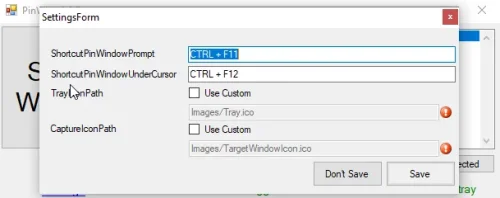
Basic functionality is there, tested on Windows XP, 7, 8.1 and 10. Multi-monitor supported (verified dual extend configuration). High DPI supported (verified 100-200%). Select another window to be top most via CTRL+F11 (same as DeskPins). Make window under cursor top most via CTRL+F12 (save a drag-and-click). User friendly installer with upgrade support. Configurable keyboard shortcuts (select and pin window, pin under cursor).- Free
- 11 Downloads
-
Windows File Manager (WinFile) is a modernized version of the file manager that was originally introduced in Windows 3.0. Microsoft has open sourced the original code and it is now being updated for modern versions of Windows by a team of developers.
- Free
- 4 Downloads
-
XnConvert is a fast, powerful and free cross-platform batch image converter. It allows to automate editing of your photo collections: you can rotate, convert and compress your images, photos and pictures easily, and apply over 80 actions (like resize, crop, color adjustments, filter, ...). All common picture and graphics formats are supported (JPEG, TIFF, PNG, GIF, WebP, PSD, JPEG2000, JPEG-XL, OpenEXR, camera RAW, HEIC, PDF, DNG, CR2). You can save and re-use your presets for another batch image conversion.
- Free
- 7 Downloads
-
TightVNC is a free remote desktop control software package that allows you to log in and use a remote machine's desktop just as if it were your own.
Tight VNC has a handy tool for both tech support and education. Saving time, money, and sometimes - frustration. Another great use is to run it on your home machines so you can securely check your items when you are away.
Like other Virtual Networking Clients, Tight VNC has two parts that you need to know: The Server and the Viewer. The Server shares the screen it is running on, and the Viewer connects controls the server. This means the machine you want to connect to must have the server-side installed in it first. You then connect to that server by typing the IP address of the device you have installed the server on. From there, it is as easy as running your machine.
Some routers may give you fits trying to configure the ports correctly, so TightVNC Server also contains a small webserver. This server listens for incoming HTTP connections on the 5800 port. You can change that to whatever you like.
- Free
- 7 Downloads
-
Smart Defrag can defragment files, folders, and entire drives as needed or scheduled. It also features SSD trimming to prolong your SSD performance and life.
It’s become almost common knowledge that the included disk defragmenter that comes with Microsoft Windows is not the best and never has been. You have many freeware replacements, and SmartDefrag is one of the best. You can set it as your Windows defragmenter replacement and forget about it, or you can go through the many options, including boot time defrag. It’s completely free and straightforward to use, as seen in the video below, where we walk you through using it.
With the improved IObit disk defrag engine, Smart Defrag not only defrags your HDD but also trims your SSD to accelerate disk access speed and enhance disk durability. Smart Defrag is also specially optimized for the file organization algorithm on Windows 10 & 11. To make it more powerful, Smart Defrag 6 provides several other useful features: Boott Time Defrag, which can defrag the Windows registry to release more RAM and ensure system stability. You can additionally customize Boot Time Defrag as per your needs. And Auto Defrag and Scheduled Defrag can ensure your disks are always optimized to their top performance and so much more.
Smart Defrag features SSD trimming to prolong the life and performance of your SSD drive.
Smart Defrag Features:
Extremely Easy to Use Exceptionally Efficient Defragmentation SSD trimming Optimize Disk Performance Always-on to Work Automatically Data Safe and Reliability Guaranteed- Free
- 6 Downloads
-
We all game at some point. All of us who game have had an experience where we wanted the ability to bypass, work through, automate or circumvent certain monotonous aspects of gameplay. (Can I get a 'hell yeah' from any players that have had to 'fish' for days?) Aurora is built just for such a task.
Aurora is designed to be a single interface to thousands of game trainers in the Cheats Happen library. Game trainers programs are designed to precisely modify the memory of a computer game on the fly, giving it the ability to alter the game behavior allowing the ability to manipulate the game itself. Because of this ability, trainers often throw off a false positive on your antivirus as a "generic," - so be prepared for that.
Aurora is a portable app, meaning you download, unzip it where you want it and that it. No install needed; click the executable to go. It will run perfectly fine unzipped on a desktop or thumb drive.
If you have the game listed, you can apply the Aurora set of trainers to that game to help you progress or have fun with that particular game in different ways. These changes vary from game to game but can include options like speed increases, god modes, stealth, teleporting, etc.
Aurora supports, Epic, Steam, GamePass, and GOG. Aurora does not support any multiplayer games and never will. This is a moral choice by the company, which we wholeheartedly support. If you want to take some unintended shortcuts for your enjoyment, that's great, but in a multiplayer environment - that's evil.
The free version of Aurora offers three games worth of free trainers each week. (Look in the bottom center for the titles) These three selections of top games will come with 100% of the functions available for those games. It is helpful to have a Steam, Epic Games Store, or Xbox Game Pass account for these to get playing quickly. The rest of the games listed will have some trainers available to test - but you will need to purchase the product to access all the features. The price ranges from $9.95 per month to a full lifetime license for a one-time payment of $84.95. Further, the free version does not require you to register an account. You can use it as a "guest," but registering is helpful if you wish to customize or eventually buy the program.
- Free
- 8 Downloads
-
Q-Dir is a free option to make managing your files and folders easy by allowing you to quickly regulate your hard disks, network folders, USB drives, floppy disks, and other storage devices.
While using this handy file manager, you can use the Quadro-View technique. You don't have to renounce the usual, Drag and Drop, all Views, and other functions of your system.
There is no need for it to be installed; it can be executed efficiently from the desktop and carried on a small USB stick or other memory devices.
Q-Dir Features:
Favorites: Quick access to most often used folders. Drag&Drop: Move files by dragging in Q-views, and other programs such as MS Explorer. Clipboard: Copy/ Paste between the Q-Dir directory views, and other programs such as MS Explorer. Folder-Type: ZIP-, FTP-,cabinet-,network-, system - folders, shortcuts ... Views: Large icons, tiles, list, detail, thumbnail (Vista: extra large symbols) . Export: to XLS, CSV, TXT, HTML. Popup Menus: Desktop, My Computer. Screen magnifier: anything on the screen can be enlarged. Color Filter: Different colors for different item types (e.g. *.log;*.txt). Highlight-Filter: Effective way for fast items highlighting. File-Filter: Allows for quick and easy filtering of the items. Columns: All columns support, and save function . Quick-Link's: For fast folder access. Folder-Select: Fast & flexible folder selection address-bar/ desktop menu/ my-computer menu/... Multi-INI: Several INI files for Q-Dir. Tree-View: Simple and quadruple. Preview: Allows a quick preview.- Free
- 5 Downloads
-
The Media Downloaders are the software that Grab or Capture multimedia files from social media websites. These files can be audio, video, or even images. Similar to the other types of download managers, most of these dedicated audio, video, or image downloaders products also include many kinds of Adware, Trackers, and PUP. It is difficult to stay uninfected while using one of these. Enter JDownloader, the one of a kind mass media download manager. The options present in this epic software are endless. Along with social websites, it supports downloading from countless file-sharing websites; you can add site-specific free or premium accounts to enjoy respective services. A clean, feature-rich, and complete mass media downloading software that deserves a place in your computer.
Features:
Platform independent. (Windows, Linux, Mac, ..) Runs on Java 1.5 or higher Complete Open-Source (GPL) 24-hour support Download several files at once Download with multiple connections JD has an own powerful OCR module Automatic extractor (including password list search) (Rar archives) Theme Support Multilingual About 110 hoster and over 300 decrypt plug-ins Reconnect with JDLiveHeaderScripts: (1400 router supported) Webupdate Integrated package manager for additional modules (eg. Webinterface, Shutdown)- Free
- 10 Downloads
-
It is quite evident that the Web Browser companies spend little to no time and resources on the development of the Download component of their products. We get a bare-bones Download feature with hardly any features. A Download Manager is a complex software, one that is always running in the background and monitoring various things such as the Windows Clipboard, and all of the web pages surfed inside Web Browsers. With a Download Manager, you get various advanced downloads related features such as resuming paused downloads, organising downloads in respective folders, download acceleration, clipboard monitoring, multimedia grabbing, virus scanning, etc. Free Download Manager provides all of these features along with many others, without any ads, promos or nags. The interface is also of the best that you can get in any download manager.
Features:
BitTorrent support Download files using BitTorrent protocol. Enhanced audio/video files support Preview audio/video files before download is completed and convert file format after download. Download acceleration Free Download Manager splits files into several sections and downloads them simultaneously, allowing you to use any type of connection at the maximum available speed. With FDM download speed increases, or even more! Resuming broken downloads When the downloading process is interrupted, you needn't start from the beginning again. Free Download Manager can resume broken download from where it was interrupted saving your time, nerves and money. Smart file management and powerful scheduler With FDM you can easily organize downloaded files by their type, placing them in predefined folders. A smart scheduler allows you to start and pause downloading files, as well as perform other actions (launch other applications, establish or hang up connection, etc.) at the set time. Adjusting traffic usage There are several traffic usage modes. You can adjust traffic usage for browsing the Internet and downloading files at the same time. Multi language support Free Download Manager is translated into 30 languages. Supported languages are: Macedonian, Serbian, Albanian, Croatian, Korean, Arabic, Brazilian Portuguese, Bulgarian, Chinese Traditional, Chinese, Czech, German, Dutch, French, Hebrew, Hungarian, Italian, Polish, Portuguese-Brazil, Romanian, Russian, Slovak, Spanish, Swedish, Turkish, Uzbek, Greek, Vietnamese, Slovenian, Persian. Absolutely free and 100% safe Free Download Manager is free, open-source software distributed under GPL license.- Free
- 19 Downloads
-
Many people rely on Windows Explorer when using their PCs. It works well but has very limited features, which is why those who want more look for other alternatives. A great example is Multi Commander. This free file manager derives its strength from the fact that it allows users to do many advanced tasks with relative ease. In addition to standard features like viewing, renaming, copying and moving, the program includes such advanced functions as auto-sorting, auto-unpacking, searching, scripting and browsing inside archives.
Other useful features include:
Dual panel layout Keyboard shortcut for all tasks Task automation Opening multiple folders using tabs Catching for faster browsing of files Completing tasks in the background Increasing functionality with the help of plugins and extensions Customizing colors and layouts according to individual preferences Compatibility with many file formats Filtering to limit viewable items Compatibility with 32bit and 64bit systems Comparing files and making relevant selections Hiding executable files and folders to improve security- Free
- 20 Downloads
-
AutoPowerOptionsOK is a small program that can automatically turn off your monitor, put your computer in sleep mode or switch between power plans.
Each action can be triggered based on the absence of keyboard and/or mouse events for a specified period of time. For example, you can automatically turn off your monitor if they mouse or keyboard have not been used for 10 minutes.
AutoPowerOptionsOK can also switch between Windows power plans (e.g. Balanced, High Performance etc.)based on whether you are actively using your computer via mouse or keyboard.
- Free
- 9 Downloads
-
Q-Dir (the Quad Explorer) makes your files and folder easy to manage. It provides fast and easy access to your hard disks, network folders, USB-Sticks, floppy disks and other storage devices. The 32-bit and 64-bit versions of Q-Dir are included and the correct one automatically used.
Key features in the alternative File-Explorer
File management in 4-window with tabs Folder size with extra information Color filter for files and folders Classic and modern address bar Directory structure with visible tree branches Print what you see in Explorer Views Based on the MS Windows OS File Manager Full Unicode Support Other options and specifications
Save folder combinations as favorites Moving and copying the data via "drag and drop" Mark selected folders and files Small program great in file management improved quad explorer file preview Multilingual Low System Resource usage Freeware ... and much more- Free
- 15 Downloads
-
Disk Cleaner is a free tool to quickly and easily clean your hard disk from temporary files like those in the system temporary folder, the Internet Explorer Cache and Cookies folder, and the Recycle Bin. It is very easy to use: select the items you would like to clean, press the clean button, and you're done! Despite the ease of use, the extendibility by plug-ins, which in fact are just simple text files, make that Disk Cleaner can also be used by power users to clean specific items. All that is needed to create a simple plug-in is a text editor, such as notepad.
- Free
- 18 Downloads
-
Wise Disk Cleaner cleans temporary files, history, cookies and autocomplete form history of Internet Explorer, Chrome, Firefox and Safari browsers. And it removes of Windows junk files, such as Recycle Bin, Recent Documents, Temporary files and Log files. This freeware tool cleans a lot more files than most similar products and includes a "slim down" mode that gets rid of a lot of extraneous objects including wallpapers and other Windows files you may never use. A disk defrag feature is also included for free.
- Free
- 16 Downloads
-
As the best free disk partition software favored by over tens of millions of users, MiniTool Partition Wizard Free helps users to repartition hard drive, format partition, check file system, align SSD partition, measure SSD performance, convert FAT to NTFS, and more on Windows 10/8/7. Aiming to become the most powerful free partition manager in the long term, it keeps offering ever-increasing new features like Disk Benchmark and Space Analyzer to bring users the best experience.
All-inclusive free partition manager to organize disk partitions to get the best of your hard drive Measure drive performance and analyze disk space usage in simple ways Fully compatible with Windows 10/8.1/8/7 all editions- Free
- 66 Downloads
-
PeaZip is a free cross-platform file manager / archive manager software that provides unified portable GUI for many Open Source technologies as 7-Zip, FreeArc, PAQ, UPX... free alternative to WinRar, WinZip and similar proprietary software.
Create 7Z, ARC, BZ2, GZ, *PAQ, PEA, QUAD/BALZ, TAR, UPX, WIM, XZ, ZIP files Open and extract ACE, ARJ, CAB, DMG, ISO, LHA, RAR, UDF, ZIPX files and more, over 200 archive types supported. Features of PeaZip includes: archives browser / explorer, integrated image viewer, batch creation and extraction of multiple archives at once, convert files, create self-extracting archives, split and join files, strong encryption with two factor authentication, encrypted password manager, secure deletion, find duplicate files, calculate hash and checksum, export job definition as script.
- Free
- 21 Downloads
-
The Uninstaller module is Revo Uninstaller‘s primary feature for situations when a program won’t uninstall normally or when you have some doubts that a program has not been uninstalled completely.
Also when a program is uninstalled, often times there are multiple files, folders, and/or Registry entries left on your system, which can cause various issues if not removed. This happens more frequently than you might think.
Revo Uninstaller acts as both a replacement and a supplement to the built-in functionality in Windows by first running the built-in uninstaller for the program, and then scanning for leftover data afterwards, making it your best choice when it comes to completely remove stubborn programs, temporary files, and other unnecessary program data that is left behind after the standard uninstall process.
The free version includes:
Scanning for leftovers after the standard uninstall 8 Additional cleaning tools included Free Professional Technical Support Uninstall Windows Apps Hunter Mode Hunter Mode is an innovative feature that allows you to select in a more flexible way the program to uninstall or manage. When you activate Hunter Mode, Revo Uninstaller ‘s main window will disappear, and a new targeting icon will appear instead. Simply drag and drop that icon over the opened window, System Tray icon, or Desktop icon of the program you wish to control, and Revo Uninstaller will display any available options in a convenient menu. This can be very useful because many programs loading on start-up and/or remain in the system tray without your consent, or you do not even know which program that is.
The Hunter Mode can come in handy when you want to uninstall an unknown program (or at the very least disable its automatic start-up in Windows), which you cannot find listed anywhere, but you can see its window or icon.
8 Additional Cleaning Tools included
Autorun Manager – control Windows startup Junk Files Cleaner – remove unnecessary files Windows Tools – useful Windows tools in one place Browsers Cleaner – clear Internet browser history MS Office Cleaner – clear Microsoft Office history Windows Cleaner – remove junk files from your Windows Evidence Remover – erase permanently confidential data Unrecoverable Delete – erase permanently files and folders- Free
- 10 Downloads
-
See what’s inside your PC
Speccy is the place to start if you need to know what’s inside your PC. See a quick summary, or dive deeper into every aspect of your PCs hardware so you can make informed upgrade and purchasing decisions.
Detailed Reporting
Speccy gives you detailed information on every piece of hardware in your computer. Save time trawling through your computer for stats like CPU, motherboard, RAM, graphics cards and more. See everything laid out for you in one clean interface.
Proactive problem solving
See real-time temperatures of critical components so you can easily spot problems before they occur.
Save Snapshots
Speccy allows you to save your scan results directly as a snapshot, XML or text file for easy sharing. Handy for making sure your new computer has the right specs, or if tech support need to diagnose an issue with your computer.
- Free
- 14 Downloads
-
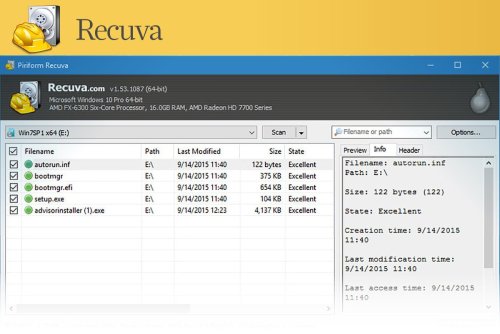
Accidentally deleted an important file? Lost files after a computer crash? No problem - Recuva recovers files from your Windows computer, recycle bin, digital camera card, or MP3 player.
Superior file recovery
Recuva can recover pictures, music, documents, videos, emails or any other file type you’ve lost. And it can recover from any rewriteable media you have: memory cards, external hard drives, USB sticks and more!
Recovery from damaged disks
Unlike most file recovery tools, Recuva can recover files from damaged or newly formatted drives. Greater flexibility means greater chance of recovery.
Deep scan for buried files
For those hard to find files, Recuva has an advanced deep scan mode that scours your drives to find any traces of files you have deleted.
Securely delete files
Sometimes you want a file gone for good. Recuva’s secure overwrite feature uses industry- and military-standard deletion techniques to make sure your files stay erased.
- Free
- 9 Downloads




Download Statistics
- 355 Files
- 13 Reviews
-
Latest Updated
-
- 2 Downloads
-
- 0 Downloads
-
- 0 Downloads
-
- 0 Downloads
-
- 0 Downloads
-
- 0 Downloads
-
- 0 Downloads
-
- 3 Downloads
-
- 2 Downloads
-
- 0 Downloads
-
- 7 Downloads
-
- 81 Downloads
-
- 4 Downloads
-
- 9 Downloads
-
- 5 Downloads
-
- 2 Downloads
-
- 4 Downloads
-
- 37 Downloads
- 0 Comments





Only guests see ads. Create a free account and/or log in for a complete ad-free experience.