Jump to content
Only guests see ads. Create a free account and/or log in for a complete ad-free experience.

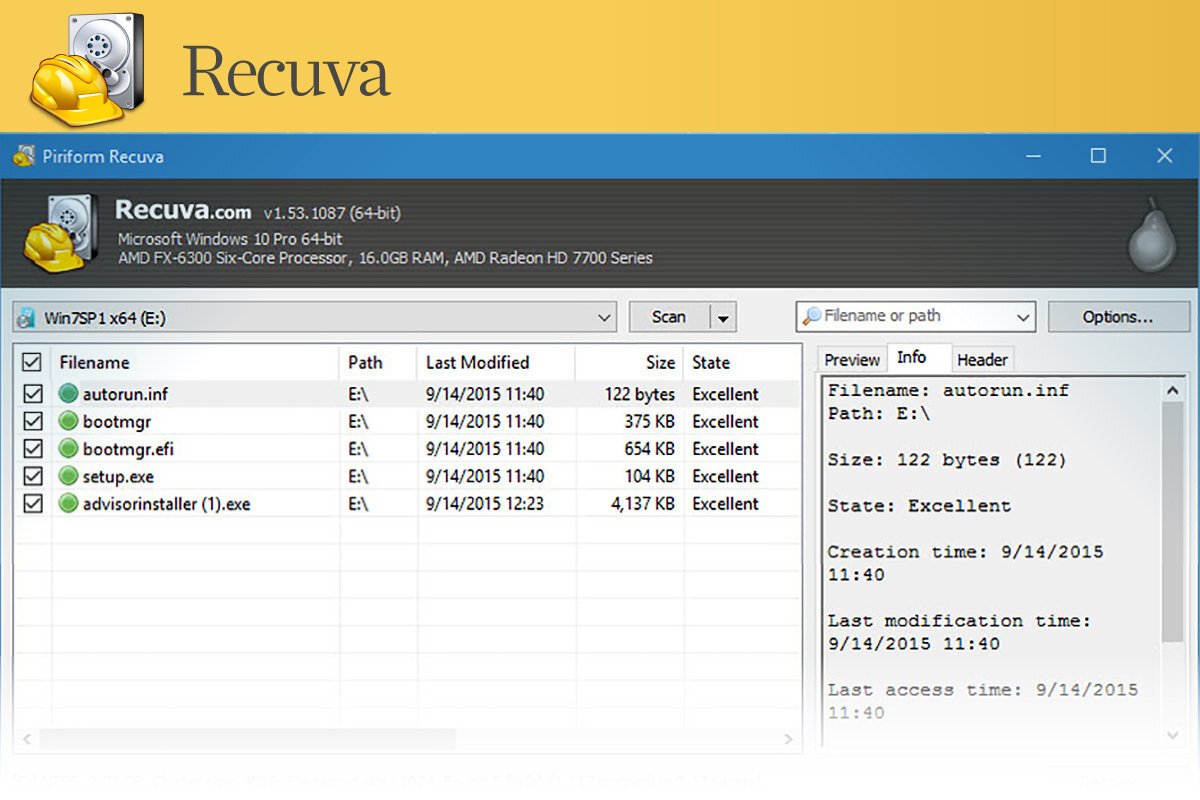
1 Screenshot

Accidentally deleted an important file? Lost files after a computer crash? No problem - Recuva recovers files from your Windows computer, recycle bin, digital camera card, or MP3 player.

Superior file recovery
Recuva can recover pictures, music, documents, videos, emails or any other file type you’ve lost. And it can recover from any rewriteable media you have: memory cards, external hard drives, USB sticks and more!

Recovery from damaged disks
Unlike most file recovery tools, Recuva can recover files from damaged or newly formatted drives. Greater flexibility means greater chance of recovery.

Deep scan for buried files
For those hard to find files, Recuva has an advanced deep scan mode that scours your drives to find any traces of files you have deleted.

Securely delete files
Sometimes you want a file gone for good. Recuva’s secure overwrite feature uses industry- and military-standard deletion techniques to make sure your files stay erased.

User Feedback

There are no reviews to display.

This title on this page are offered with the knowledge that it is currently freeware and/or abandonware. If the status of the title changes, or you would like these files removed, please do not hesitate to contact us.

Only guests see ads. Create a free account and/or log in for a complete ad-free experience.

Important Information

We have placed cookies on your device to help make this website better. You can adjust your cookie settings, otherwise we'll assume you're okay to continue. Read our Terms of Use and Privacy Policy for more information.

Configure browser push notifications

Chrome (Android)
  1. Tap the lock icon next to the address bar.
  2. Tap Permissions → Notifications.
  3. Adjust your preference.
Chrome (Desktop)
  1. Click the padlock icon in the address bar.
  2. Select Site settings.
  3. Find Notifications and adjust your preference.