

Only guests see ads. Create a free account and/or log in for a complete ad-free experience.


SirMadsen
Administrators
-
Joined
-
Last visited
Files posted by SirMadsen
-
Planet Earth has been invaded by aliens, transforming humans into a walking zombies, so they're easier to control. The only hope of humanity is Harry (the game is often also referred to the original name from 1985 - Haloween Harry), in which the role you put yourself you. You have to skip through many levels where you fight against all sorts of aliens and your mission is to free as many humans as possible and eventually save the entire Earth. During the game you will find different weapons, most have a very limiting ammo, so be careful what you shoot on. Game Alien Carnage is a great side-scrolling platformer that Apogee released in 2007 as freeware.
- Free
- 9 Downloads
-
Sometimes a person just needs to shut down and play some completely crazy shooter which only goal is to entertain you, without heavy thinking over complicated puzzles. Jack Jazzrabbit 2 offers exactly this. Jazzrabbit 2 is now a cult game in platform games world. The game is crazy - from its graphic elements and features to the gameplay, music and characters. Although at first glance it may not look like it is a classic love story between boy and girl, and as always, girl gets kidnapped and it is up to you to save her. In this case, the love is between bunny rabbits Jack and Eve and in the game you play the role of Jazz, but you can also play as Jazz's brother Spaza, or his sister Lori. You will enjoy several different levels in underground, swamp, forest, also in the lava fields, that are nicely done in a crazy style.
- Free
- 7 Downloads
-
Red Alert is one of the most successful and well known real-time strategy, following on the first Command & Conquer released in 1995. Game mechanisms and strategies has not been changed - you have to build a base, produce combat units and you harvest resources. The story, however, is distinctly different - it is not about two enemy organizations, but you can play either for allies or for Soviets. These two sides battle for the fate of planet Earth itself. The game has a variety of missions: from conventional forestry, through missions on the water and also indoor missions, where you have to use only infantry.
- Free
- 9 Downloads
-
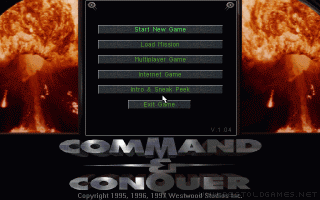
Command & Conquer follows the megasuccesful game Dune 2 and it has created a successful series of real-time strategies: C&C. The game focuses on the war between the two organizations, The Brotherhood of Nod and the Global Defense Initiative (GDI). The player can take control of both sides of more than 15 missions. Both have different units and structures, including artillery, tanks and light infantry.
- Free
- 8 Downloads
-
Caesar is a clone of Civilization from the period of the Roman Empire. You must build a city, take care of its key features, such as: settlement, roads, police, water supply, social events etc. You are not limited to one city - you can build other areas, unite them with roads, once you find out the first one works just fine. You do not have to worry about everything yourself, you can have slaves who are gonna help you.
- Free
- 4 Downloads
-
As the game name itself suggests - plot of the game takes place in the past, namely in 200 BC, in the Roman era. Your task is to help Caesar to develop and expand his empire by conquering new territory, where you build new cities. You start with a small village and you need to further develop and take care of it. You must provide drinking water, education, protection, entertainment and all the other typical urban stuff for city residents. You must also think of the external protection of the city, because many barbarian hordes may attack your city. If you manage to solve all these things, you might eventually become the new Caesar. If you like SimCity and Civilization, you'll love the game Caesar 2 too.
- Free
- 6 Downloads
-
Dune II is one of the most important games and absolute gaming legend that has defined the whole game genre of real-time strategies. Its success has tried to follow the game Dune 2000 but has not been as successful, as it should be. Dune has inspired several freeware versions that have tried to improve some elements from the original game. The most successful remake of Dune is Dune IV - created from scratch by Vladislav Demjanišin (same author also created Dune III, but IV was more popular). Compared to Dune II game brings many improvements: higher resolution for newer computers, better gaming control (choice of several units at once), better artificial intelligence, more dynasties, etc.
- Free
- 6 Downloads
-
Blue Byte Softwares Albion uses ingenuity, style, and a dash of innovation to propel the role-playing experience. The story is set in 2227, and the starship Toronto finds a lush alien planet full of juicy minerals – Albion. You’ll get around the strange world of Albion using a simple mouse interface, and most of the time you’ll view the action from a skewed, top-down perspective. You won’t be going alone. The party of characters follows the leader in single-file as you drag the mouse around the screen.
- Free
- 9 Downloads
-
PokerTH Portable is a classic Texas Hold Em style poker game. With support for up to 10 networked or computer players, custom avatars, custom cards, online chat, sound and an easy-to-use graphical interface, it's sure to provide hours of fun play.
- Free
- 7 Downloads
-
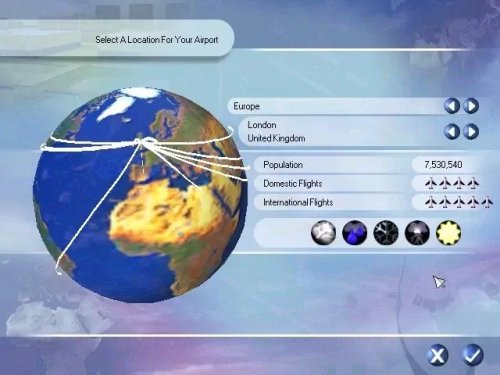
Similar to other games of this type, players take on the role of an airport manager. Players first select a location for their airports from several cities around the world. Players then constructs a terminal for passengers, then runways, tarmac, control towers and support services.
Players then attracts businesses to their airport by signing contracts with vendors in the terminal and contracting flights into and out of the airport. Players also manage the airport's budget, which cannot operate at too much of a loss. Players can operate passenger airports and cargo airports with different considerations for each.
A number of preset scenarios are also available to the player, including the conversion of a major cargo airport to a passenger airport in Beijing.
- Free
- 3 Downloads
-
Airport Tycoon 2 is the sequel to Airport Tycoon, and as such is a simulation of the construction and management of an Airport. Elements such as location, weather, volume of customers, dispostion of customers, business contracts and disasters will be simulated. Improvements and additions to the original game will include a more elaborate instruction manual, a more user-friendly tutorial system, better graphics, more music and sound effects, simpler, more uniform interface, refined and simplified game play, fewer but more unique locations, an improved camera system, new and interesting disasters, and a condensed Aircraft list. AT2 will use a far better engine that will support better visuals and game-play then the first.
- Free
- 4 Downloads
-
Airport Tycoon is a business simulation game released for Windows 95/98 in 2000. It was developed in the United Kingdom by Krisalis Software. In Airport Tycoon, the player must successfully build and manage an airport without going bankrupt. There have been two sequels created for Airport Tycoon: Airport Tycoon 2 and Airport Tycoon 3.
- Free
- 6 Downloads
-
One of 7th Level's most obscure releases before fading into obscurity, Ace Ventura is a decent cartoon adventure starring the wacky cartoon series of the same name which was popularized by a Jim Carrey movie.
Despite featuring some hilarious voice acting and excellent animation, Ace Ventura is ultimately little more than an average adventure game that's disappointingly short and easy. GameSpot has the lowdown on this one:
"Dude, pull my finger. Did that make you laugh? Then you're probably going to like Ace Ventura.
Borrowing from the Ace Ventura cartoon series, the game features all the same gags, mannerisms, and obnoxiousness from the world's famous pet detective - the kind of stuff that's so stupid, you have no choice but to laugh. And it's the humor that keeps the game afloat. The gameplay you've seen a dozen times before. Once again, Ace is on the case, this time traveling the earth looking for a lost creature. Masters of click-and-solve games will be able to finish the entire game in no time flat. In fact, a lot of it is so simple, you'll figure out that the game is partly designed for young children.
- Free
- 7 Downloads
-
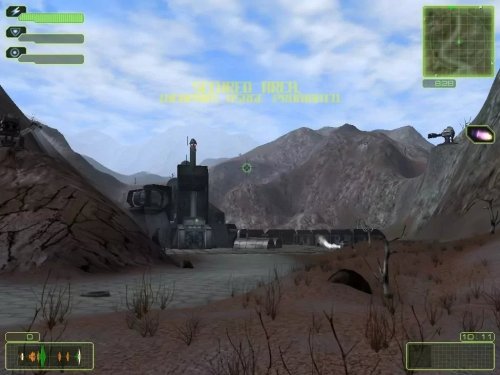
Artifical Intelligence Machine is an open-world action RPG developed by russian SkyRiver Studios and published by 1C Company (1C Entertainment nowadays). It was initially released in February 27, 2004 in Russia and Baltic States for Microsoft Windows. A.I.M. did not have very ambitious promotion campaign, so it was being sold mainly in Russia and Europe. The only legitimate way to get the game is by buying it's installation CD second-hand as it was not published on Steam or any other online services.
- Free
- 5 Downloads
-
2001, the year A*M*E*R*I*C*A: Expansion Pack was released on Windows. Published by Data Becker GmbH & Co. KG,.
A*M*E*R*I*C*A: Expansion Pack is an addon for A*M*E*R*I*C*A, you will need the original game to play.
- Free
- 16 Downloads
-
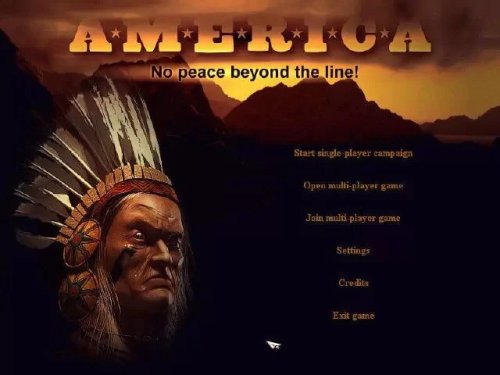
America (ironically enough) was developed by a German software firm, Data Becker. The concept behind this title is a familiar one. The player must gather and manage resources (food, wood, and gold), build structures, create "units" (people), and achieve certain specific mission objectives (which typically amount to conquering your opposing nations and/or defending yourself from the same). Few people would argue with the assertion that this sounds more than just vaguely familiar. America's gameplay style is just what one might expect from a mainstream real time strategy. In a nutshell, it is (as many other titles are) very similar to the Age of Empires series. While I hate to compare every new real time strategy game to Age of Empires II, this eminent title is widely accepted as a standard bearer of the genre. Hence, I will succumb to this temptation and utilize the Age of Empires series as the yardstick by which to measure America on more than one occasion.
- Free
- 12 Downloads
-
Feel the wrath in the thrilling sequel, Rage of Mages II: Necromancer, a role-playing, real-time strategy game. Recruit stalwart allies to aid you against your enemies. Gather powerful weapons to show your might and wield awesome magic as you complete important quests and train your character to be the mightiest of all.
Across a barren wasteland, a sleeping evil crawls from the depths of the earth. At first content to slowly build their strength within a small region, the Necromancers will soon reveal their awesome power as they move to subjugate the entire land for their evil purposes. Wielding dark magic, they have perfected the art of raising the dead and now command these terrible minions to obey their slightest whim. Amassing an army is a trivial task for those that can summon the black legions of departed souls. You must embark upon a journey to improve strength and skill, enlist powerful allies, and recover a lost talisman of ancient magic to survive the coming onslaught. Ultimately you must seek out the lair of the Necromancers and destroy them and their undead puppets before they can carry out their terrifying plans. Are you ready?
43 non-linear, branching missions: Rage of Mages II: Necromancer personalizes the game playing experience by allowing players to experience greater variety on their quest. New story set in an original realm: Players lead their party of adventurers through Arabian-style desert cities and arboreal Druid villages. Each location delivers new challenges and new foes. Over 400 weapons, items, spells, objects and buildings to help adventurers in their travels. 80 unique foes to conquer, including hideous skeletons, zombies, Druids, shamans, and the lethal race of Necromancers. Each foe features deadly new combat abilities. New ally system: Players can now crush the competition by allying with Orcs and Trolls, as well as with other people. Increased replay value: Additional multiplayer arenas support up to 16 players.- Free
- 9 Downloads
-
25 to Life is a third-person shooter video game developed by Avalanche Software and Ritual Entertainment and published by Eidos Interactive for Microsoft Windows, PlayStation 2, and Xbox and released in 2006.
Set in a modern environment, the game allows the player to play as both a cop and a gangster, at different times, in a "cops and robbers" style game. The game can be played online with up to 16 players.
The game is about a man named Freeze, his friend Shaun Calderon, and a police officer, Officer Williams. The game features three playable protagonists during single player campaign in the game. Freeze commits crimes with Shaun to get money, which he promptly spends for his family while Officer Williams is trying to stop at all costs the organized crime and felony across the city of Las Ruinas (based on Los Angeles).
One night upon returning home, his wife confronts him about these actions. Saying they are a bad influence to their son, she wants him to stop. After an argument, he agrees. The next day, he tells Shaun he wants out of the game. Shaun levels a gun on Freeze, informing him that he must do one last "job"—a narcotics trade.
- Free
- 5 Downloads
-
DOSBox is a DOS-emulator that uses the SDL-library which makes DOSBox very easy to port to different platforms. DOSBox has already been ported to many different platforms, such as Windows, BeOS, Linux, MacOS X...
DOSBox also emulates CPU:286/386 realmode/protected mode, Directory FileSystem/XMS/EMS, Tandy/Hercules/CGA/EGA/VGA/VESA graphics, a SoundBlaster/Gravis Ultra Sound card for excellent sound compatibility with older games...
You can "re-live" the good old days with the help of DOSBox, it can run plenty of the old classics that don't run on your new computer!
DOSBox is totally free of charge and Open Source.
- Free
- 12 Downloads
-
Boxer plays all the MS-DOS games of your misspent youth, right here on your Mac.
There’s no clots of configuration and baffling DOS commands between you and your fun: just drag-drop your games onto Boxer, and you’ll be playing in minutes.
Boxer takes your CDs, floppies and bootleg game copies and wraps them into app-style gameboxes you just click to play. They’re self-contained so you can back them up or share them with friends. No mess, no fuss.
If your nostalgia demands more, then decorate your games with gorgeous icons and admire your collection from your very own Finder games shelf.
Boxer is powered by DOSBox’s robust DOS emulation, which means it’ll play almost any DOS game you throw at it.
MS-DOS HAS NEVER LOOKED SO GOOD.
Boxer is designed to look, feel and work beautifully: just like everything else you love on your Mac.
That means Boxer fits hand in glove with OS X: you can launch programs and gameboxes straight from Finder, search your collection in Spotlight, add extra drives in DOS just by drag-and-drop.
And if you run into trouble, there’s comprehensive built-in help just a click away.
- Free
- 7 Downloads
-
After Windows 98, came the Windows 98 SE. Here, SE stands for Second edition and was released on the 5th of May in the year 1999. Both Windows 98, as well as the Windows 98 SE operating systems, were supported by Microsoft till the 30th of June 2002. Buyers could, however, get extended support till the 11th of July 2006.
- Free
- 3 Downloads
-
This is Windows 95, running in an Electron app.
It works on macOS, Windows, and Linux. Bear in mind that this is written entirely in JavaScript, so please adjust your expectations.
This project is provided for educational purposes only. It is not affiliated with and has not been approved by Microsoft.
For FaQ and mroe support go the developers github page found under "More Information" tab.
If needed:
Username: windows95
Password: password
- Free
- 3 Downloads
-
If talk of the alternatives being Linux and UNIX is leaving you on edge, consider ReactOS as your Windows alternative.
Originally launched in 1996 as a Windows 95 clone project, the official website states that "the ultimate goal of ReactOS is to allow you to remove Windows and install ReactOS without the end user noticing the change."
In short, the aim is that you should be able to continue using your PC as you did before. ReactOS features over 9 million lines of code and is open source.
However, ReactOS has been in the alpha stage for quite some time now. While some apps, such as Adobe Reader, will run on ReactOS, many won't. It's lightweight, though, requiring just 500MB of hard disk space and 96MB of RAM to run.
One day, ReactOS might be a perfect, free alternative to Windows, but until then, it is available for your evaluation. Install it from the boot CD or run the LiveCD on your existing operating system.
- Free
- 7 Downloads
-
Windows 3.x was the first to gain significant development and commercial traction. It combined the 8086, 286, and 386 modes of Windows 2 in to one package. It replaced the MSDOS Executive with a Program Manager and File Manager similar to those in OS/2 1.x. Much of its success was spurred by the availability and success of Microsoft Office. Although Microsoft would have had you believe otherwise, Windows 3.x was the direct foundation for Chicago/Windows 95.
Release notes
Microsoft Windows 3.1 was an evolution to Windows 3.0 and undoubtably the most popular, poster child version in the Windows 3.x series. Among the changes in Windows 3.1 include a drop of real mode support (see more below), the removal of the Reversi game, updated icons with richer colors, an improved setup process with better hardware detection, and the introduction of batch install. The File Manager was completely revamped and a revamped hypertext help system was introduced.
Applications could talk to each other not only through the DDE (Dynamic Data Exchange) protocol, also used by OS/2, but also by the new Windows-only OLE protocol which allows for applications to share any type of object more seamlessly. Write, Paintbrush and the new Object Packager have support for this technology which remains with us today in Windows 8.
Windows 3.1 also came with support for TrueType fonts which provide more realistic font rendering as they are outline fonts that can scale to any point size. With TrueType users could finally have a good grasp that what was shown on the screen would be what was printed without blocky outlines. TrueType survives today along with its close cousin OpenType.
Multimedia support was now fully integrated along with the expandable Control Panel into Windows 3.1. In Windows 3.0 this was provided by a Multimedia PC add-on which usually came with new Multimedia PCs, sound cards and CD-ROM drives of the day. Common supported cards include Adlib and Sound Blaster 16.
BETA During development Windows 3.1 was under the development codename Janus and 3 prerelease versions have surfaced, two beta candidates and a release candidate. The final beta was compiled on December 17, 1991 and expects a BIOS date of the 18th or later. Purple was replaced with blue and the boot screen was overhauled to the modern 3.1 variant.
Windows 3.2 was a Chinese language specific release. The only difference from 3.1 was additional support for Chinese characters and was released in late 1993.
On 386 systems and greater you can run a limited subset of 32-bit Windows applications (mostly those for Windows NT 3.5 and 95) with the Win32s (Win32 subset) patch.
- Free
- 68 Downloads
-
It's a portable App, enjoy!
Extract from zip then put ModManFX64.exe file somewhere on your harddrive
--> NOT in <\WINDOWS...> and NOT in <\Program files...> and NOT in your game folder
--> ie: <your drive>:\MODMANFX\ModManFX64.exe
that's all. Launch it. A blue Microsoft windows message will occur saying "Unknown product", just bypass...
it will automatically create its subfolder at first launch.
ModManFX - Free for ever generic mod manager utility
ModManFX manage your mods and do all necessary files backup in one click
- Free
- 27 Downloads











Only guests see ads. Create a free account and/or log in for a complete ad-free experience.