

Only guests see ads. Create a free account and/or log in for a complete ad-free experience.


SirMadsen
Administrators
-
Joined
-
Last visited
Everything posted by SirMadsen
-
 From Steams discussions. - https://steamcommunity.com/app/1623730/discussions/0/4203615689063242470/ With that said. Some say that building materials such as wood, stone and other materials Are shared. Either way, using the quick travel is probably your best bet to move resources you need.
 -
Shaders are small programs that tell your GPU how to render things like lighting, shadows, reflections, textures, water, fog, and other visual effects. Modern games can use thousands of different shader combinations. Before your GPU can efficiently use them, many of these shaders need to be compiled specifically for your GPU, graphics driver, and settings. That’s where the shader cache comes in. When a game says “Compiling Shaders” or “Loading Shader Cache,” it’s preparing these shaders ahead of time and storing the compiled versions on your drive. The next time they're needed, the game can simply grab them from the cache instead of compiling them while you're playing. Without this process, shader compilation may happen during gameplay, which can cause annoying stutters, frame-time spikes, and temporary FPS drops, especially when entering a new area or seeing an effect for the first time. This is also why a game may rebuild its shader cache after a GPU driver update, game update, graphics settings change, or hardware change. The old compiled shaders may no longer be compatible or optimal. So while watching a shader compilation bar crawl across the screen isn't particularly exciting, it's usually doing you a favor. 😄" src="https://cdn.jsdelivr.net/joypixels/assets/8.0/png/unicode/64/1f604.png" title="Grinning face with smiling eyes :smile:" data-shortname=":smile:" loading="lazy" width="64" height="64"> In short: Shader compilation = preparing graphics code for your GPU. Shader cache = saving that work so it doesn't have to be done again during gameplay.
-
This explains how to install the full build of FFmpeg on Windows 11, and how to add it to the system PATH so that ffmpeg, ffprobe, and ffplay can be used from any terminal or external application. What You GetWith a proper full installation you will have: ffmpeg.exe – main tool for audio/video conversion and processing ffprobe.exe – tool for inspecting media files (codecs, streams, metadata, etc.) ffplay.exe – simple media player based on FFmpeg Once installed and added to PATH, you can run: ffmpeg -version ffprobe -version ffplay -version from any Command Prompt / PowerShell window. 1. Download FFmpeg Full BuildOpen your browser and go to the official FFmpeg website: https://ffmpeg.org → Download → Windows In the Windows builds section, choose a trusted build provider, for example: Gyan FFmpeg Builds (attached in this post) or BtbN Builds Download a 64-bit full build (often called full_build or similar), usually a .zip file, e.g.: ffmpeg-7.x-full_build.zip Once the download finishes, extract the .zip file. You should see something like: 2. Choose an Installation FolderDo not leave FFmpeg inside Downloads. Instead, move it to a stable location, for example: C:\ffmpeg or C:\Program Files\ffmpeg ExampleCreate the folder: C:\ffmpeg Move the extracted content into C:\ffmpeg, so that you have: 3. Add FFmpeg to the PATH (Windows 11)To use ffmpeg from any Command Prompt / PowerShell window, you must add its bin folder to the PATH environment variable. 3.1 Open Environment VariablesYou can do this in two ways. Method A – via Start menu Press Win and type: env Click “Edit the system environment variables”. In the System Properties window, click “Environment Variables…”. Method B – via Settings Press Win + I to open Settings. Go to System → About. Click “Advanced system settings”. Click “Environment Variables…”. 3.2 Add theYou can add FFmpeg to: User variables (only your user account can use it), or System variables (all accounts can use it – requires admin rights). Here is the typical way using User variables: In the Environment Variables window, in the top section “User variables for ”, locate Path. Select Path and click “Edit…”. In the Edit environment variable window: Click OK on all open dialog windows to save the changes. Click “New” Add the path to FFmpeg’s bin folder, for example: C:\ffmpeg\bin 4. Verify the InstallationClose all existing terminal windows (Command Prompt, PowerShell, Windows Terminal, etc.). Open a new Command Prompt: Press Win, type cmd, and press Enter. Run: ffmpeg -version If everything is configured correctly, you should see FFmpeg version information, something like: You can also test: to confirm those tools are available too. 5. Common Issues & Fixes5.1If you see: Double-check you added the correct pathto the Path variable, e.g.: C:\ffmpeg\bin Make sure you clicked OK on all windows after editing Path. Close and reopen the terminal window. If you had multiple FFmpeg installations, ensure the correct path is present and at the top of the list. 5.2 Multiple FFmpeg Versions in PATHIf you had older FFmpeg installations (e.g. C:\Program Files\ffmpeg-old\bin), Windows might use the first entry in Path. To clean this up: Open Environment Variables again. Edit Path and remove any obsolete FFmpeg entries. Keep only the path you want, e.g.: C:\ffmpeg\bin Optionally, move this entry to the top of the list. Using FFmpeg in Your Own AppsOnce FFmpeg is in PATH, any application can call it just by using the command name ffmpeg without needing a hard-coded full path. Example: Python (subprocess) This will work as long as FFmpeg is installed and the PATH is configured correctly. 7. Uninstall or Move FFmpegIf you want to move or remove FFmpeg: Remove its entry from the Path environment variable. Delete or move the C:\ffmpeg folder (or whichever folder you used). Restart your terminal. Running ffmpeg -version should now fail, confirming it is removed. 8. LicenseFFmpeg is licensed under the LGPL/GPL (depending on how it is built and which libraries are included). For detailed licensing information, see: https://ffmpeg.org/legal.html When redistributing FFmpeg binaries or using it in your software, make sure you comply with the relevant licenses.
-
-
-
-
The film industry is mourning the loss of acclaimed New Zealand actor Sam Neill, who has died at the age of 78. His passing marks the end of a career that spanned more than five decades and produced some of cinema's most memorable performances. Neill became a household name around the world through his portrayal of Dr. Alan Grant in Steven Spielberg's Jurassic Park (1993). His performance as the intelligent and reluctant dinosaur expert helped define one of Hollywood's most successful franchises, and he later returned to the role in several sequels, including Jurassic World Dominion. A Career Beyond DinosaursAlthough many fans associate Neill with Jurassic Park, his body of work extended far beyond the prehistoric adventure series. Throughout his career he demonstrated remarkable versatility, appearing in dramas, thrillers, historical films, and television productions. Among his notable credits were The Hunt for Red October, The Piano, Event Horizon, and the acclaimed television series Peaky Blinders. Whether playing heroes, villains, or morally complex characters, Neill earned a reputation as one of the industry's most dependable and respected actors. A Beloved Figure in SwedenSam Neill also enjoyed a unique connection with Swedish audiences thanks to his role as Brian de Bois-Guilbert in the 1982 adaptation of Ivanhoe. The film became an annual New Year's Day television tradition in Sweden, introducing generations of viewers to one of his earliest memorable performances. Over the years, Neill acknowledged the tradition with warmth and humor, often sharing greetings with Swedish fans as the annual broadcast approached. His Health BattleIn 2023, Neill revealed that he had been diagnosed with a rare form of blood cancer. He openly discussed his treatment and his determination to continue working despite the diagnosis. Earlier this year, he shared encouraging news that his cancer was in remission, making the announcement of his death all the more unexpected. An Enduring LegacyWith more than 100 film and television credits to his name, Sam Neill leaves behind an extraordinary legacy. His ability to bring intelligence, charm, and emotional depth to every role made him a favorite among audiences and filmmakers alike. For many, he will forever be remembered as the scientist who faced dinosaurs with courage and wit. For others, he was a gifted performer whose career showcased remarkable range and consistency. Though Sam Neill is gone, his performances will continue to entertain and inspire audiences for generations to come.
-
You would normally see "Test Mode" like that when disabling driver signature enforcement. You can just enable it again. A reboot should automatically disable the driver signature bypass. If not, try this. Reboot your PC and hit F7 (might differ depending on your board manufacturer) during the boot progress. Click/tap on Troubleshoot on the Choose an option screen at boot. Click/tap on Advanced options in Troubleshoot options. Click/tap on Startup Settings in Advanced options. Click/tap on the Restart button in Startup Settings. When the computer restarts into Startup Settings, press the 7 or F7 key to Disable/enable driver signature enforcement. Option 2Enable or Disable Driver Signature Enforcement in Command Prompt It is required to disable Secure Boot if you get the error message below while trying to enable Test Mode. An error has occurred setting the element data. The value is protected by Secure Boot policy and cannot be modified or deleted.Open an command prompt in admin mode. Copy and paste the command you want to use below into the elevated command prompt, and press Enter. Enable driver signature enforcement - DEFAULT bcdedit /set nointegritychecks off OR Disable driver signature enforcement bcdedit /set nointegritychecks on Reboot your PC.
-
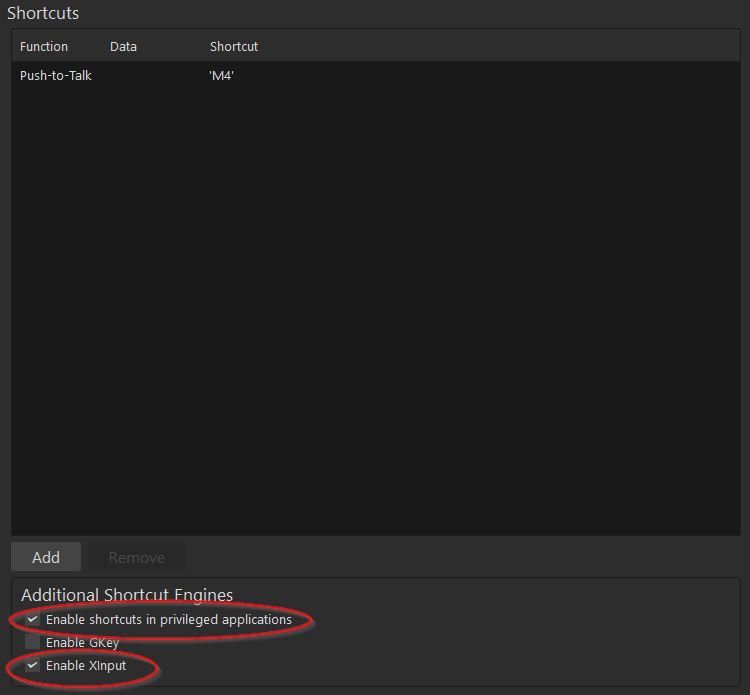
Hi AshleywaL, A few common mistake on Mumble is not have certain settings activated. Make sure that under your Shortcut settings: Enable shortcuts in privileged applications Enable XInput Are turned on. The first one especially since it allows Mumble to use your keys and not being taken over by other software. Start there, this is the most common issue I've seen.
-
Have you ever searched for a simple cooking tip and been told to use non-toxic glue to keep your cheese on your pizza? Or perhaps you’ve been advised by a "top result" to eat at least one small rock a day for your health? These aren't just funny glitches. They are the fatal symptoms of what experts call the "Dead Internet Theory" becoming a reality. In a world where nearly 50% of web traffic is bots, the search engine we once trusted has transformed into a closed-loop echo chamber. Here is the breakdown of why Google is breaking and why it might be time to look for a new window to the digital world. 1. The Hallucination Problem: AI Over SearchIn May 2024, Google introduced "AI Overviews." Instead of giving you a list of links to human-written articles, it now prioritizes an AI-generated summary at the very top. The problem? These summaries often pull from the worst corners of the internet. The Pizza Glue Incident: Pulled from an 11-year-old Reddit troll post. The Rock-Eating Advice: Sourced from a satirical article on The Onion. Because the AI can't distinguish between satire, trolling, and fact, it "hallucinates" answers that are presented as absolute truth. 2. The Death of Independent WebsitesIn March 2024, Google released a massive algorithm update intended to "clean up" the web. Instead, it acted like a digital sledgehammer for small, human-run sites. Traffic Collapse: Niche, human-tested review sites (like House Fresh) saw their traffic drop by as much as 91% almost overnight. The Walmart Effect: High-quality independent sites have been buried under "Parasite SEO", where big corporations use the authority of sites like LinkedIn or Medium to spam low-quality, AI-written content that ranks higher just because of the platform it's on. 3. The "Search Heist" and Zombie PagesThe internet is currently being "looted" by bot networks. Domain Heists: Marketers use AI to scrap entire competitor sitemaps and generate thousands of articles in minutes to "poach" millions of search hits. Zombie Pages: Bot networks buy up expired, dormant domains and pump them full of AI content to redirect traffic away from real businesses. 4. Model Collapse: The AI "Inbreeding" CrisisPerhaps the scariest part of this shift is a phenomenon called Model Collapse. This happens when AI models begin training on data produced by other AIs rather than human-generated content. The Cycle: As AI content floods the web, Google’s AI absorbs this synthetic, often flawed data. The Result: Like genetic inbreeding, the errors compound. The AI starts repeating its own mistakes, performance degrades, and specific, nuanced human knowledge is filtered out in favor of "majority" bot-speak. 5. You are the Training Data, Not the CustomerGoogle’s priority has shifted from being a "useful tool" to a "profitable behemoth." Zero-Click Searches: Over 58% of searches now result in "zero clicks". Google wants you to stay on their page, reading their AI summaries, so they can keep you in their advertising ecosystem. The Reddit Deal: Google recently paid $60 million to Reddit to use its human conversations to train Gemini AI. Your organic discussions are now the fuel for the very machine that is replacing the open web. Is There a Way Out?Europol warns that up to 90% of online content could be AI-generated by the end of 2026. If we want to save the human internet, we have to start looking elsewhere. Some users are pivoting to "human-only" search engines like Kagi or Margelia, which prioritize non-commercial, organic content. Others are returning to "retro" communities and smaller, subscription-based platforms where you aren't the product. The internet you grew up with is gone. The question is: are you going to keep feeding the machine, or is it time to find a new way to connect?
-
What is the single scariest thing that can happen when you use a computer? Most people would say getting hacked. Usually, we mitigate this by updating our software and using strong passwords. But what happens when someone utilizes an exploit that nobody—not even the software developers—knows exists? That is what the tech world calls a zero-day attack. Typically, security researchers discover these flaws, report them to the vendor privately, collect a reward, and the bug gets patched. But over the last few weeks, the standard rulebook was thrown completely out the window. In what is turning out to be one of the most chaotic standoffs in cybersecurity history, a single disgruntled security researcher has gone completely scorched earth against Microsoft. The Catalyst: Six Zero-Days Dropped Into the WildA researcher operating under the moniker Nightmare Eclipse recently shocked the industry by publicly releasing six unpatched zero-day vulnerabilities for Microsoft Windows. Instead of reporting them through official channels, the researcher published them directly to GitHub (which ironially, is owned by Microsoft) and GitLab. Why? According to the researcher, they previously tried to report major bugs via the Microsoft Security Response Center (MSRC) only to be allegedly humiliated, insulted, and left with "zero pennies" for their work. Faced with a trillion-dollar company that refused to pay out a bug bounty, Nightmare Eclipse decided to become Microsoft’s worst nightmare. The Nasty Exploits: Bypassing BitLockerAmong the six disclosed vulnerabilities, a couple stand out as particularly dangerous cyber threats: The BitLocker Security Bypass: This exploit affects Windows 11 systems and allows an attacker to bypass BitLocker drive encryption. Typically, if your laptop is stolen, encryption prevents unauthorized users from pulling files off your hard drive. This zero-day completely evades that defense. The "Blue Hammer" Privilege Escalation: Another leaked zero-day allows a standard user account to instantly escalate its permissions to system-level control—the highest possible administrative access on a Windows machine. Alarmingly, because these were dropped directly into the wild as a public proof-of-concept (PoC), cybersecurity firms have already noted that this code is actively being utilized by malicious actors online. Accusations of BackdoorsThe plot thickens with the BitLocker bypass. According to Nightmare Eclipse, the specific component triggering the exploit only exists within Windows Recovery Environment (winre) images on Windows 11, despite identical naming structures existing in standard installations without the triggering functionality. The researcher raised heavy suspicions that this design choice feels far too convenient—fueling theories that the vulnerability may have intentionally acted as a "backdoor" for law enforcement or government entities to bypass standard warrants and access encrypted physical devices. Microsoft’s Blunder and the "Streisand Effect"In response to the leaks, Microsoft quickly banned Nightmare Eclipse’s GitHub account. When the researcher migrated to GitLab, those repositories were wiped as well. However, trying to scrub data from the internet always triggers the Streisand Effect. By trying to censor the leaks, Microsoft only drew massive attention to them. Security communities immediately grabbed the code, ensuring it will float around the web forever. Microsoft finally issued a public statement addressing the situation, heavily leaning on "coordinated vulnerability disclosure" and shifting the narrative to a "shared responsibility." Vaguely threatening, Microsoft also noted that their Digital Crimes Unit and law enforcement partners are building cases against those enabling this activity. Industry veterans and founders of Microsoft's original bug bounty programs have actively criticized the tech giant's handling of the situation, calling it a "dumpster fire of Microsoft’s own making." Instead of simply paying the researcher to quietly fix a nuclear-level threat, Microsoft's rigid response effectively created its own corporate supervillain. Looking Ahead: The July 14th DeadlineThis internet battle is far from over. Nightmare Eclipse has publicly declared a looming deadline: July 14th. The researcher claims to hold massive troves of internal documentation and potentially more exploits that they intend to drop on that date, promising to leave Microsoft's security reputation "shattered." The Bottom Line: Whether the upcoming leak is a massive bluff or another wave of cyber warfare, the vulnerabilities already in the wild are very real. If you are a Windows user, keep your system strictly updated, exercise aggressive common sense online, and do not run untrusted software. Someone shot this researcher's proverbial dog, and they are out for corporate blood.
-

From the album: Portraits
© Mikael Madsen
-
-
-
-
-
-
-
The Immortals of Terra: A Perry Rhodan Adventure The Immortals of Terra: A Perry Rhodan Adventure takes place in "Perryversum", a huge science-fiction world conceived in 1960 and developed through 2400 printed novellas. The main character is Perry Rhodan, immortal emperor of the earth, played in 3rd person. The game starts in 4394 AD when Mondra Diamond, Perry's girlfriend, is abducted by minions of an unknown enemy during a fierce galactic attack on The Residence, the headquarters of the immortals. Determined to get to the bottom of the incident, Perry sets himself on uncovering the evil schemes of the mysterious opponent and freeing Mondra from his clutches. The game is a classic point-and-click adventure, featuring 2D backgrounds and pixel-shaded 3D characters. It features an interactive, iconic inventory system which contains not only collected items but also story related concepts (persons of interest, objects learned about or seen). These icons can be used during conversations as well as part of puzzle solving. The game contains 5 chapters, each taking place on a unique planet. File Information Submitter SirMadsen Submitted 02/24/2026 Category Adventure View File
-
 The Immortals of Terra: A Perry Rhodan Adventure takes place in "Perryversum", a huge science-fiction world conceived in 1960 and developed through 2400 printed novellas. The main character is Perry Rhodan, immortal emperor of the earth, played in 3rd person. The game starts in 4394 AD when Mondra Diamond, Perry's girlfriend, is abducted by minions of an unknown enemy during a fierce galactic attack on The Residence, the headquarters of the immortals. Determined to get to the bottom of the incident, Perry sets himself on uncovering the evil schemes of the mysterious opponent and freeing Mondra from his clutches. The game is a classic point-and-click adventure, featuring 2D backgrounds and pixel-shaded 3D characters. It features an interactive, iconic inventory system which contains not only collected items but also story related concepts (persons of interest, objects learned about or seen). These icons can be used during conversations as well as part of puzzle solving. The game contains 5 chapters, each taking place on a unique planet.Free
 -
Matrix Matrix Website: https://matrix.org Our Matrix Space: https://matrix.to/#/#madsens-crib-tog:matrix.org In the world of online communication, platforms like Matrix and Discord have become go-to choices for various types of discussions. Whether it's for casual hangouts, gaming, or business collaboration, both platforms offer unique features and advantages. However, when it comes down to deciding which one to use, it's essential to consider their differences. In this blog post, we'll compare Matrix and Discord across several key areas such as usability, privacy, customization, and more to help you choose the one that best suits your needs. And of course, Matrix will not require your personal ID for age verification... Yet. What is Matrix?Matrix is an open-source, decentralized communication protocol that enables real-time communication through a variety of platforms and services. Unlike traditional chat apps, Matrix operates through a federated model, meaning no single entity owns the entire network. Matrix users can communicate across different Matrix servers (or homeservers), which provides an added layer of freedom and control over data. Open-Source: Matrix's protocol is open-source, allowing for community-driven development and transparency. Federated Network: Unlike centralized platforms, Matrix allows users to choose or create servers, offering decentralized control. Matrix vs. Discord: Key Differences1. Privacy and Data OwnershipMatrix: One of Matrix’s main selling points is its commitment to privacy and data ownership. As an open-source, decentralized platform, Matrix allows users to control their data by hosting their own servers. This provides an additional layer of security, as personal data doesn't need to be shared with third parties. Pros: Complete control over your data; no centralized authority. Cons: More complex to set up and maintain your own server. Discord: Discord, on the other hand, is a centralized platform where all user data is hosted on Discord’s servers. While Discord has implemented end-to-end encryption for direct messages (DMs), much of the communication, such as messages in channels, is stored on their servers. Users need to trust Discord with their data. And you shouldn't considering they just recently had a big data breach. Pros: Simple to use; you don't need to worry about server maintenance. Cons: Your data is stored and controlled by Discord. Data breaches. Facial ID for age verification. They use third party vendors for their facial id which means Discord can say they don't store the information but the third parties might (and do according to their own information). 2. Ease of UseMatrix: Matrix's user experience can vary significantly depending on the client or application used to access it (e.g., Element, Synapse, or Riot). While the Matrix protocol is quite flexible, some clients can be clunky or difficult to navigate for newcomers. Pros: Flexible and customizable; various client options. Cons: The learning curve can be steep for new users; the interface can be inconsistent. Discord: Discord has a polished, user-friendly interface that appeals to a wide range of users, from gamers to professionals. It's easy to set up servers, join communities, and manage chats. Discord’s layout is intuitive, and it integrates voice, video, and text chat seamlessly. Pros: Very easy to use, intuitive interface; all-in-one platform for messaging, video, and voice. Cons: Limited customization compared to Matrix. 3. Customization and FlexibilityMatrix: Because Matrix is open-source and federated, it offers greater customization and flexibility. You can create custom servers, bots, and integrations, allowing you to tailor the experience to your specific needs. However, customization can require more technical know-how. Pros: High degree of customization; choice of homeservers; full control over features and settings. Cons: Customization requires technical knowledge; server management can be complex. Discord: Discord offers some level of customization with things like bot integrations, custom emojis, and channel permissions. However, because it is a proprietary platform, customization options are limited compared to Matrix. You also can't create or manage the underlying infrastructure. Pros: Easy to set up bots and emojis; user-friendly moderation tools. Cons: Less flexibility for developers or power users; more rigid structure. 4. Community and EcosystemMatrix: Matrix’s decentralized nature means that it has a more niche, fragmented community. While the protocol itself is widely used, the ecosystems of Matrix servers can vary, and you may find that not everyone uses the same server or client. Pros: A decentralized and community-driven ecosystem with diverse usage. Cons: Can feel less cohesive; a more fragmented user base. Discord: Discord has a massive, centralized community with a wide variety of servers, from gaming groups to business teams. Its ecosystem is easy to navigate, and it's simple to find servers based on specific interests. Pros: Large and active user base; easy to find like-minded communities. Cons: A centralized ecosystem means you are reliant on Discord's servers for uptime and reliability. 5. Security and EncryptionMatrix: Matrix has built-in end-to-end encryption for private conversations and supports various security standards. Since you can control your own server, you can implement your own security measures as well. However, some parts of Matrix (e.g., public rooms) may not be fully encrypted. Pros: End-to-end encryption for private chats; customizable security features. Cons: Public rooms may not be encrypted; self-hosting requires security expertise. Discord: Discord uses encryption for data in transit, and DMs are end-to-end encrypted. However, since Discord is a centralized platform, it holds the keys to the data. In the event of a security breach, all user data could potentially be compromised. Pros: Strong security measures in place; end-to-end encryption for DMs. Cons: Centralized model means Discord controls the security of the platform. 6. Voice and Video FeaturesMatrix: Matrix has integrated voice and video chat functionality, but it is not as polished as Discord’s offerings. There are third-party services that can be used for voice and video calls, but these integrations are often less seamless than Discord's built-in features. Pros: Decentralized voice and video options available. Cons: Features may not be as smooth or feature-rich as Discord's. Discord: Discord is widely regarded as having one of the best voice and video chat systems for group calls. It allows high-quality voice channels and streaming capabilities, making it ideal for gamers, team collaboration, or social events. Pros: Superior voice and video quality; low latency; easy screen sharing. Cons: Some features are locked behind Nitro (premium) subscriptions. Conclusion: Which One Is Right for You?The choice between Matrix and Discord depends largely on your priorities. Choose Matrix if you value privacy, data ownership, and the freedom of a decentralized network. If you have the technical skills to set up and manage your own server, Matrix offers the most control and customization options. Choose Discord if you’re OK with giving up your personal information, personal id, looking for a user-friendly, all-in-one platform with superior voice and video features. It’s ideal for people who want a simple setup without dealing with server management or technical complexities. Ultimately, both Matrix and Discord are excellent tools for online communication, what matters most is which features align best with your needs. Whether you want decentralization or polished user experience, there’s a platform suited for every type of online community.
-
This is a reference for the WoW defined slash commands available for use in the WoW chat window, and as WoW macro commands in a macro. NotesCommands are listed in lower case, however in chat can be upper or lower case. For macros a command is entered on a single line ending with a new-line '\n' character. Emotes list is from FrameXML\GlobalStrings.lua. Key? - command has not been tested or fully confirmed. REMOVED - Removed from WoW, retained here for historical reference. DISABLED - Command still exists, but does not function. DEPRECATED - Is deprecated and should no longer be used. Commands with multiple aliases are listed under the most expanded alias. PvP commandsArena following arena commands were removed (in 5.4) teamcaptain - /teamcaptain,/tcaptain - Sets the captain of an arena team you are in. teamdisband - /teamdisband,/tdisband - Disbands an arena team you are in. teaminvite - /teaminvite,/tinvite - Invites a member to your arena team. teamquit - /teamquit,/tquit - Leaves an arena team you are in. teamremove - /teamremove,/tremove - Removes a member of a team you are in from that team. Battlegrounds wargame - /wargame,/wg - Starts a War Game. Blizzard Interface commandsThese functions open a part of the Blizzard Interface achievements - /ach,/achieve,/achievement,/achievements - Opens the Achievements interface. calendar - Opens the Calendar interface. guildfinder - /guildfinder,/gf - Opens the Guild Finder tool. lfd - /lfd,/df,/dungeonfinder - Opens the Dungeon Finder interface. lfr - /lfr,/raidbrowser,/rb,/or,/otherraids - Opens the Raid Browser. macro - /macro,/m - Opens the Macro interface. stopwatch - /stopwatch,/timer,/sw - Opens the Stopwatch interface. Chat commandsafk - /afk,/away - Marks you as "Away From Keyboard". announce - /announce,/ann - Toggle channel announcements. ban - Bans a user from a user-created chat channel. battleground - /battleground,/bg - Sends a chat message to your battleground. csay - /c,/csay - Sends chat text to a channel. chatinvite - /cinvite,/chatinvite - Invite a user to a user-created chat channel. chatlist - /chatlist,/chatwho,/chatinfo - Displays a list of users in a chat channel, or what channels you are currently a member of. chatlog - Enables/disables chat logging. combatlog - Enables/disables combat logging. chathelp - /chat,/chathelp - Displays a list of commonly used chat commands. ckick - Kicks a user from a user-created chat channel. emote - /emote,/em,/e,/me - Perform an emote with the given text. dnd - /dnd,/busy - Marks you as "Do Not Disturb". guild - /guild,/g,/gc - Sends a chat message to your guild. instance - /instance,/i - Sends a chat message to the group of your instance (raidfinder etc.) join - /join,/channel,/chan - Joins or creates a user-created chat channel. leave - /leave,/chatleave,/chatexit - Leaves a user-created chat channel. moderator - /mod,/moderator - Sets moderation in a user-created chat channel. mute - /mute,/squelch,/unvoice - Prevents a user from speaking (voice or text) in a user-created chat channel. officer - /officer,/o,/osay - Sends a chat message to your guild's officer channel. owner - Displays or changes the owner of a user-created chat channel. password - /password,/pass - Sets or removes a password on a user-created chat channel. party - /party,/p - Sends a chat message to your party. raid - /raid,/rsay - Sends a chat message to your raid. raidwarning - /raidwarning,/rw - Sends a raid warning to your raid. reply - /r,/reply - Replies to the last user to send you a whisper with a message. resetchat - /resetchat - Resets chat settings to default. say - /say,/s - Sends a chat message to players in your immediate local area. unban - Unbans a user from a user-created chat channel. unmoderator - /unmod,/unmoderator - Removes moderation from a user-created chat channel. unmute - /unmute,/unsquelch,/voice - Allows a user to speak (voice or text) in a user-created chat channel. whisper - /whisper,/w,/tell,/t,/send - Sends a private chat message to a player in a whisper. yell - /yell,/y,/sh,/shout - Sends a chat message to all players in your zone. Character commandsThese commands affect your character's status, social interaction, movement, or actions dismount - Dismounts your character equip - /equip, /eq - Equip an item to its default slot. equipset - /equipset - Change equipped items to a set stored in the Equipment Manager equipslot - Equip an item to a specific slot. friend - /friend,/friends - Adds a player to your Friends list. follow - /f,/follow,/fol - Set yourself to follow the selected target ignore - Adds a player to your ignore list inspect - /ins,/inspect - Opens the Inspection interface of the selected target. leavevehicle - Allows your character to exit their current vehicle. randompet - Summons a random companion pet (non-combat pet). removefriend - /removefriend,/remfriend - Removes a friend from your friend list. settitle - Sets the active title for your character. trade - Opens the trade interface with your current target. unignore - Removes a player from your ignore list EmotesThese commands generally cause a character to 'act out' or emote. May be abreviated to any shorter length, so long as there is no other conflicting command name or abbreviated command name. For example '/congratulate' can be typed as '/cong'. Key: * does nothing, + has sound, % has unique animation, @ only when mounted (varies by mount) absent agree amaze angry, mad apologize, sorry %applaud, applause, bravo arm +attacktarget awe backpack badfeeling, bad bark bashful beckon %beg bite blame blank bleed, blood blink blush boggle bonk, doh bored bounce %bow brandish brb breath brow burp, belch +bye, goodbye, farewell cackle calm challenge +charge charm +cheer %chicken, flap, strut chuckle chug clap cold comfort commend confused +grats, congrats cough coverears crack, knuckles cringe crossarms %cry, sob, weep cuddle, spoon curious curtsey %dance ding disagree doubt drink, shindig drool duck %eat, chew, feast embarrass encourage enemy eye eyebrow facepalm, palm faint fart %fear, cower fidget, impatient %flex, strong +%flirt flop +followme frown, disappointed gasp gaze giggle glare gloat glower go going golfclap greet, greetings grin, wicked, wickedly groan grovel, peon growl guffaw hail happy, glad, yay headache +healme +hello, hi +helpme hiccup highfive hiss holdhand hug hungry, food, pizza hurry idea +incoming, inc insult introduce jealous jk %kiss, blow %kneel %laugh, lol lavish, praise laydown, liedown, lay, lie lick listen look lost love luck map massage mercy moan mock moo moon @mountspecial mourn mutter nervous +no +nod, yes nosepick, pick object, holdit offer +oom +openfire pack panic pat peer pet pinch pity plead %point poke ponder pounce pout pray promise proud pulse punch purr puzzled raise, volunteer +rasp ready, rdy regret +retreat, flee revenge %roar, rawr rofl rolleyes, eyeroll %rude ruffle sad %salute scared scoff scold scowl scratch, cat, catty search sexy shake, rear shakefist, fist shifty shimmy %shindig shiver shoo, pest shout, holler shrug shudder %shy sigh signal silence, shush +silly sing %sit slap %sleep smack smile smirk snap snarl sneak sneeze snicker sniff snort snub soothe spit spoon squeal stand stare stink, smell surprised surrender suspicious sweat %talk talkex, excited talkq, question tap taunt tease +thank, thanks, ty think thirsty threaten, doom, wrath tickle tired +train truce twiddle *unused veto victory violin +wait warn %wave +welcome whine whistle wink %woot work %yawn Combat commandsThese functions pertain to combat cancelaura - Cancels (turns off) an aura you have. cancelqueuedspell - /cancelqueuedspell,/cqs - Cancels casting of the spell you have in the queue. cancelform - Cancels your current shapeshift form. cast - /cast,/spell,/use - Uses the given item or casts the given spell. castglyph - Activates a glyph. castrandom - /castrandom,/userandom - Casts a random spell from the given list. castsequence - Casts the given spells in sequential order. changeactionbar - Changes your current action bar page. duel - Challenge another player to a duel forfeit - /forfeit,/yield,/concede - Forfeit a duel. pvp - Sets whether or not you are attackable by other players. startattack - Turns on auto-attack. stopattack - Turns off auto-attack. stopcasting - Stops casting or channeling. swapactionbar - Swaps between two given action bars. Guild commandsguilddemote - /gdemote,/guilddemote - Demotes a guild-member. guilddisband - /gdisband,/guilddisband - Disbands a guild. guildinfo - /ginfo,/guildinfo - Displays information about your guild. guildinvite - /ginvite,/guildinvite - Invites a player to join your guild. guildleader - /gleader,/guildleader - Makes another guild member the new Guild Master. guildquit - /gquit,/guildquit - Removes your character from your current guild. guildmotd - /gmotd,/guildmotd - Sets the guild Message of the Day. guildpromote - /gpromote,/guildpromote - Promotes a guild member to the next higher rank. guildroster - /groster,/guildroster - Opens the Guild window. guildremove - /guildremove,/gremove,/gkick - Removes a member of your guild from your guild. Party and Raid commandsclearmainassist - /clearmainassist,/clearma,/mainassistoff,/maoff - Clears the current Main Assist. clearmaintank - /clearmaintank,/clearmt,/maintankoff,/mtoff - Clears the current Main Tank. clearworldmarker - /clearworldmarker,/cwm - Clears world markers invite - /inv,/invite - Invites a player to your party or raid. ffa - Sets the loot method for your raid/party to Free-For-All. group - Sets the loot method for your raid/party to Group Loot. master - Sets the loot method for your raid/party to Master Loot. mainassist - /mainassist,/ma - Set the main assist. maintank - /maintank,/mt - Set the main tank. needbeforegreed - Sets the loot method for your raid/party to Need Before Greed. promote - /pr,/promote - Promotes the given member to Party or Raid leader. raidinfo - Shows you what instances you are saved to, along with the Instance ID. readycheck - Performs a ready check in your raid or party. roundrobin - Sets the loot method for your raid/party to Round Robin. targetmarker - /targetmarker,/tm - Sets or clears a target marker from your current target. threshold - Sets the loot threshold to apply loot rules. uninvite - /uninvite,/u,/un,/kick,/votekick - Removes a player from your current party or raid. worldmarker - /worldmarker,/wm - Allows placement of world markers. Pet commandspetassist - Sets pet to assist mode petattack - Sends pet to attack currently selected target. petautocastoff - Turn off autocast for a pet spell. petautocaston - Turn on autocast for a pet spell. petautocasttoggle - Toggle autocast for a pet spell. petdefensive - Set pet to defensive. petfollow - Set pet to follow you. petmoveto - Set pet to move to and stay at a hover-targeted location. petpassive - Set pet to passive mode. petstay - Set pet to stay where it is at. System commandsconsole - Allows user to view or change global client-side options, or perform certain system commands. click - Simulate a mouse click on a button. disableaddons - Disables all addons and reloads the UI. dump - Displays the value of a given variable. enableaddons - Enables all addons and reloads the UI. eventtrace - /eventtrace,/etrace - Allows the user to trace events in-game. framestack - /framestack,/fstack - Allows the user to see all frames under the cursor. help - /h,/help,/? - Displays a help message with some basic commands. logout - /camp,/logout - Logs your character out of the game, back to the character selection screen. macrohelp - Displays a help message with basic information about creating and using macros. played - Displays information about your character's time logged in. quit - /quit,/exit - Exits the game. random - /random,/rand,/rnd,/roll - Generates a random number from 1 to 100. "/random X" rolls a number from 1 to X, "/random X Y" rolls a number from X though Y. reload - Reloads the User Interface. script - /script,/run - Runs a block of LUA code. stopmacro - Stop processing the current macro. time - Displays the current time timetest - Used for benchmarking, also shows FPS. who - Shows you a list of people matching filtering options. Targeting functionsassist - /assist,/a - Targets a player's target. clearfocus - Clears the current focus target. cleartarget - Clears the current target. focus - Set a focus target target - /target,/tar - Target the given unit by name. targetenemy - Target the given hostile unit by name. targetenemyplayer - Target the given hostile player by name. targetexact - Target the unit by exact name match. targetfriend - Target the friendly unit by name. targetfriendplayer - Target the friendly player by name. targetlastenemy - Target the last attackable unit you had selected. targetlastfriend - Target the last friendly unit you had selected. targetlasttarget - Target the target of the last unit you had selected. targetparty - Target a party member by name. targetraid - Target a raid member by name.
-
In order to change the PHP version using the .htaccess file simply put this one piece of code on a new line. In this example we set the version to 8.2. Just change the code to your fitting. Don't use dot between version numbers. So for example 8.2 is set by using just 82. AddHandler application/x-httpd-alt-php82 .php .php5 .phtml
-
More rumors around Edward Kenway. The mythical remake of Assassin's Creed: Black Flag can be released before the summer. According to Ubisoft's financial report, all upcoming games on the menu must be released before the end of March 2026. The report also mentions a title that has not yet been revealed and this may well be Ubisoft's pirate adventure. As I said, the remake of Black Flag has not yet been officially unveiled, but there are many rumors pointing towards it. The voice actors in the game have hinted that a remake is coming and the French game site Jeuxvideo has had a lot of information about the development. Reasonably, the game should be unveiled soon, one might think?
-
Known as Yuri Command & Conquer. Role in Kojima's OD. German actor Udo Kier has passed away, aged 81. He was known for a number of films and television series, but in the game world he is of course immortal in the role of Yuri in Command & Conquer: Red Alert 2 and the expansion Yuri's Revenge. He also had roles in Call of Duty: WWII (2017) and Martha is Dead (2022). His voice and face would also have been part of Hideo Kojima's upcoming OD. It is unclear what is happening with Udo Kier's role in OD now. Is it completely ironed? Is a new ability being brought in? Do you manage to do something with what you have recorded so far (how much or how little is unclear)? It remains to be seen. Kojima does not give any information, but today he wants to pay tribute to Udo Kier instead for the "icon" he was. Udo wasn't just an actor. He was truly an icon of his time. We have lost a big icon. There will never be anyone like him. Udo, rest in peace. I will never forget you. Kojima writes on X that he "lacks words" and that "everything happened so suddenly". How much recorded material for OD is available is unclear, but it has not been possible to record "for a long time", says Kojima. Rest in peace, Udo Kier. Thanks for everything.













Only guests see ads. Create a free account and/or log in for a complete ad-free experience.