Jump to content
Only guests see ads. Create a free account and/or log in for a complete ad-free experience.

Be Part of Our Community

Did you know, as a member you can create blogs, add downloads, share images and much more! Now isn't that worth a free account and ad-free experience? We think it is. Welcome in friend.

  • Replies 3
  • Views 8
  • Created
  • Last Reply

Top Posters In This Topic

Most Popular Posts

  • SirMadsen
    SirMadsen

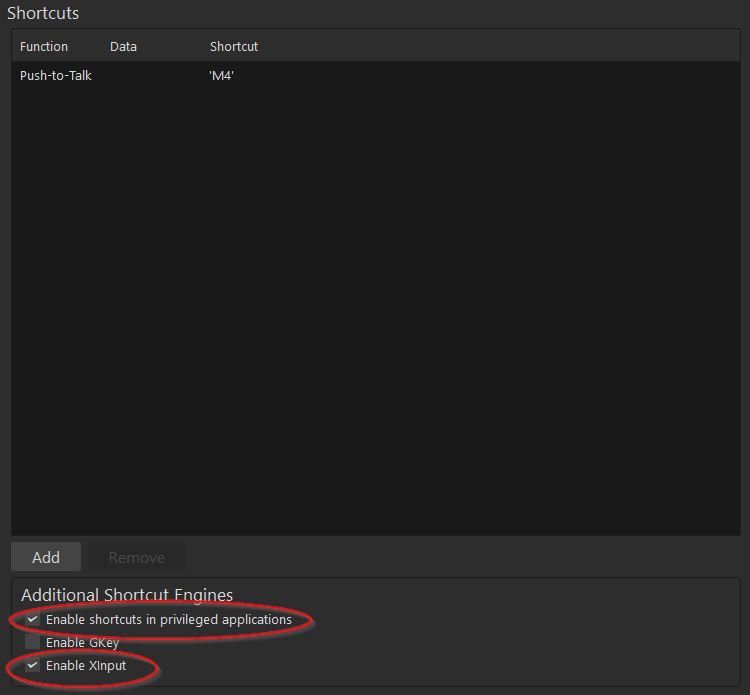
    Hi AshleywaL, A few common mistake on Mumble is not have certain settings activated. Make sure that under your Shortcut settings: Enable shortcuts in privileged applications Enable XInput Are turned

  • AshleywaL
    AshleywaL

    Thank you so much, that was it. The privileged setting was not ticked in.

  • AshleywaL
    AshleywaL

    And thanks for the fast reply!

Posted Images
Solved by SirMadsen

Go to solution

Featured Replies

  • Administrators
  • Solution

Hi AshleywaL,

A few common mistake on Mumble is not have certain settings activated.

Make sure that under your Shortcut settings:

  • Enable shortcuts in privileged applications

  • Enable XInput

Are turned on. The first one especially since it allows Mumble to use your keys and not being taken over by other software.

Start there, this is the most common issue I've seen.

Mumble.jpg

It's all good ❤️

Join the conversation

You can post now and register later. If you have an account, sign in now to post with your account.
Note: Your post will require moderator approval before it will be visible.

Guest
Reply to this topic...
Only guests see ads. Create a free account and/or log in for a complete ad-free experience.

Important Information

We have placed cookies on your device to help make this website better. You can adjust your cookie settings, otherwise we'll assume you're okay to continue. Read our Terms of Use and Privacy Policy for more information.

Configure browser push notifications

Chrome (Android)
  1. Tap the lock icon next to the address bar.
  2. Tap Permissions → Notifications.
  3. Adjust your preference.
Chrome (Desktop)
  1. Click the padlock icon in the address bar.
  2. Select Site settings.
  3. Find Notifications and adjust your preference.