Jump to content
Only guests see ads. Create a free account and/or log in for a complete ad-free experience.

Starfield Trainer 2023-09-01

(0 reviews)

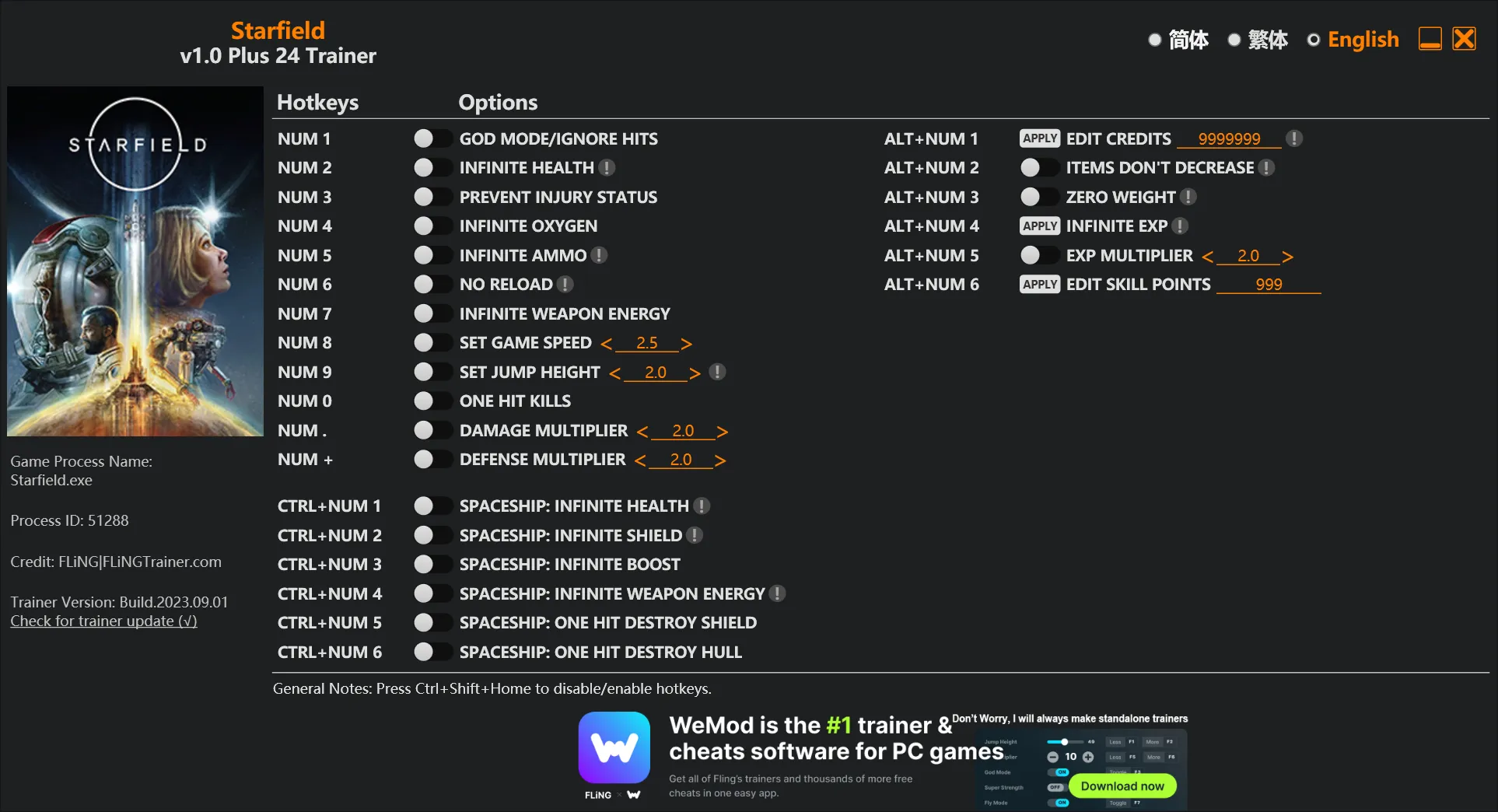
1 Screenshot

  • Num 1 – God Mode/Ignore Hits
  • Num 2 – Infinite Health
  • Num 3 – Prevent Injury Status
  • Num 4 – Infinite Oxygen
  • Num 5 – Infinite Ammo
  • Num 6 – No Reload
  • Num 7 – Infinite Weapon Energy
  • Num 8 – Set Game Speed
  • Num 9 – Set Jump Height
  • Num 0 – One Hit Kills
  • Num . – Damage Multiplier
  • Num + – Defense Multiplier


  • Ctrl+Num 1 – Spaceship: Infinite Health
  • Ctrl+Num 2 – Spaceship: Infinite Shield
  • Ctrl+Num 3 – Spaceship: Infinite Boost
  • Ctrl+Num 4 – Spaceship: Infinite Weapon Energy
  • Ctrl+Num 5 – Spaceship: One Hit Destroy Shield
  • Ctrl+Num 6 – Spaceship: One Hit Destroy Hull


  • Alt+Num 1 – Edit Credits
  • Alt+Num 2 – Items Don’t Decrease
  • Alt+Num 3 – Zero Weight
  • Alt+Num 4 – Infinite Exp
  • Alt+Num 5 – Exp Multiplier
  • Alt+Num 6 – Edit Skill Points

User Feedback

There are no reviews to display.

This title on this page are offered with the knowledge that it is currently freeware and/or abandonware. If the status of the title changes, or you would like these files removed, please do not hesitate to contact us.

Only guests see ads. Create a free account and/or log in for a complete ad-free experience.

Important Information

We have placed cookies on your device to help make this website better. You can adjust your cookie settings, otherwise we'll assume you're okay to continue. Read our Terms of Use and Privacy Policy for more information.

Configure browser push notifications

Chrome (Android)
  1. Tap the lock icon next to the address bar.
  2. Tap Permissions → Notifications.
  3. Adjust your preference.
Chrome (Desktop)
  1. Click the padlock icon in the address bar.
  2. Select Site settings.
  3. Find Notifications and adjust your preference.