

Important Information
We have placed cookies on your device to help make this website better. You can adjust your cookie settings, otherwise we'll assume you're okay to continue. Read our Terms of Use and Privacy Policy for more information.
We have placed cookies on your device to help make this website better. You can adjust your cookie settings, otherwise we'll assume you're okay to continue. Read our Terms of Use and Privacy Policy for more information.
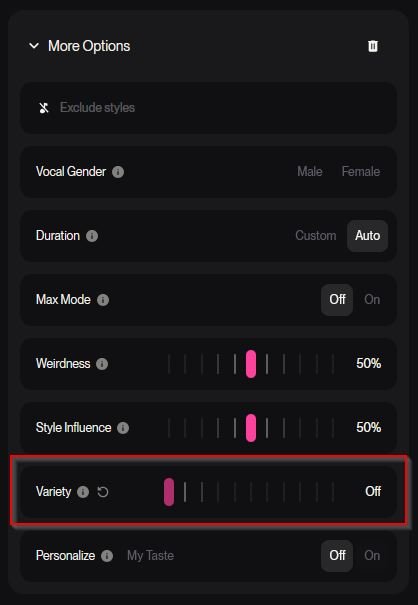
Suno have just released their new top model V.6. Along with better vocals and better consistency there are some new features in the "More Options" settings. If you are having issues with getting your song styles to follow your style prompt, there is a new setting you need to turn off.
At the bottom there is a setting called "Variety". It defaults to Normal which means Suno will automatically use AI to change your style prompt, creating a new style with the styles you have put in mixed with styles of your latest songs. Meaning if you recently made a song with a style prompt with for example "Reggae, Jamaican vocals" and now you're creating a new song with a style prompt with for example, "Rock, Metal Anthem", Suno will create a personalized advanced style of Reggae and Metal Anthem.
It's probably not supposed to lean that hard into your recent styles and the feature will most likely undergo some changes (maybe). So for now, just turn that feature off by dragging the slider all the way to the left and Suno will follow your style prompt exactly.
☕ It's all good ❤️